Route planning apps for electric cars

A screenshot showing various route planning apps, including Google Maps, Apple Maps, ZapMap, Electroverse, PlugShare and ABRP

Since I first got my own car (10 years ago), we’ve used Google Maps for directions. I’ve never bothered with a stand-alone satnav, and our Nissan Leaf is the first car that we’ve owned to have one built-in.

With our electric Nissan Leaf, Google Maps is still our go-to app for route planning and directions, but there are some other apps that I’ve considered. Here’s an overview of them.

Google Maps

Starting with Google Maps. Its support for electric vehicles is okay; you can tell it that your car is an electric vehicle, and it’ll offer the most energy-efficient routes as well as the fastest. Remember, electric and hybrid cars have regenerative braking; in a petrol or diesel car, a shorter but slower route may only use a little less fuel, but a lot less energy in an electric car. On one recent journey, a slower but more direct route took five minutes longer, but used 29% less charge and meant that would get there and back without having to recharge en route.

You can also tell Google Maps what plugs your car supports. Our Nissan Leaf, for example, can charge from a 3-pin plug, a Type 2 AC charger and CHAdeMO DC chargers. Then, when you switch your car from being petrol/diesel to electric, it’ll no longer offer to show you directions to petrol stations, but to public electric car chargers instead.

Google Maps will show public chargers from the majority of major operators, and their occupancy. However, compared to some of the other apps mentioned here, it won’t show all chargers.

If you have a really new electric car with Google Maps built-in, then it’ll know your car’s current charge and be able to add charging stops for long journeys. Our Nissan Leaf doesn’t – we can just use Google Maps through CarPlay or Android Auto. As such, it won’t automatically suggest charging stops on longer journeys.

Apple Maps

Note: I’m writing this about Apple Maps in iOS 18, which was current at the time of writing

I’m sure that Apple Maps works great, if you live in California. I don’t, and since Apple launched it 13 years ago in iOS 6, it’s been a disappointment. If you do live in California, or a supported country, then there are EV features available to you. But it appears that the UK either isn’t a supported country, or it just doesn’t work with my Nissan Leaf. Either way, for me, there are no special features available in Apple Maps.

I can’t even tell Apple Maps that I drive an electric vehicle, and so it still bubbles up petrol stations which are of limited use to me now. You can search for ‘charging point’ and get directions to charging points, but it can’t easily incorporate these into a route. It also recommended a charging point to me which didn’t actually exist.

ZapMap

ZapMap has probably the best list of UK electric car chargers. As well as listing all of those on the main charging networks, including availability, users can also add chargers themselves. These are often ‘destination chargers’ at places where you can visit, which may be offered for free and are not part of a larger network.

The app is ad-supported, and won’t work with CarPlay or Android Auto unless you pay for ZapMap Premium. This currently costs £5 per month, or £35 for a full year if paid in advance (£30 if you sign up before the end of the month). As well as hiding the ads, you get a free ZapMap RFID charging card (normally £10) and a 5% discount if you pay for certain public chargers through the ZapMap app. As I only use public chargers occasionally, I may consider the £5 per month option when needed, and then cancel.

The free app lets you plan a limited number of routes, which can then be sent to either Apple or Google Maps for navigation.

Octopus Electroverse

Electroverse is the public charging app from Octopus Energy. It doesn’t list as many chargers as ZapMap, as it focusses just on those on the major networks. However, it offers things like route planning, CarPlay and an RFID card for free, unlike ZapMap, and there are no adverts. It also looks nicer.

It’s worth noting that, by default, it’ll only show public chargers that are compatible with the Electroverse app and RFID card. This means that public chargers from Pod Point initially don’t appear, for example. You can turn this off if you want to prioritise seeing a wider range of chargers.

The route planning is quite good. You can tell it what car you drive, your start and end points, and how much charge you expect to start with. It’ll then calculate a route that includes stops at compatible chargers, and it’ll tell you how much you need to charge at each stop and how long it’ll take. You can then send the route to Google or Apple Maps. Note that in CarPlay mode, handoff is only to Apple Maps and not Google Maps, so bare that in mind.

PlugShare

PlugShare is another site that allows user contributions of public charger places. Unlike ZapMap, which is UK focussed, PlugShare is global. Its list of chargers is extensive, and even includes chargers which are ‘under construction’. I checked a couple of these locally, and found that, whilst there was planning permission in place for these, construction work hadn’t started. I think this is where Apple Maps may be getting its data from, but without the knowledge that they’re under construction.

It supports route planning, but this seems to be limited to showing public chargers on a given route. Unlike Electroverse, it didn’t tell me how much to charge up by and how long to stop for, and wouldn’t send the details to a mapping app. It supports CarPlay though.

ABRP – A Better Route Planner

A Better Route Planner is worth considering. It’s a full replacement for Apple Maps or Google Maps, and is designed for electric cars. Like with Electroverse, you can select your car and the starting charge, and it’ll plan routes to include car chargers.

CarPlay is limited to ABRP Premium, which also allows you to factor in weather conditions when driving, and to prefer chargers where there are toilets or children’s play areas. And, like Google Maps, ABRP Premium incorporates traffic data. It can also connect to live battery data in more cars, albeit in a somewhat roundabout way. For my Nissan Leaf, it needs an OBD2 adaptor and the Leaf Spy Pro app (£20) set up. ABRP Premium costs €5 per month, or €50 per year.

Combining the apps

At the moment, I’m using a combination of all three:

  • Google Maps for general navigation
  • Electroverse for calculating charge levels on a route, or incorporating charge points into a route plan
  • ZapMap for finding charger locations

It would be nice if Google Maps included charge levels in its route planner on cars that don’t have it built-in; that would minimise my need to use other apps. Still, by planning my routes in Electroverse and sending them to Google Maps, I can achieve most of the features of ABRP without their premium subscription. Once I’ve picked up an OBD2 adaptor that’s fully compatible with Leaf Spy, I may give ABRP another try though.

Little Moreton Hall

A photo of Little Moreton Hall, a Tudor house

Back in March, I listed the National Trust properties reachable from our home that we hadn’t been to. Last month, we were able to tick Little Moreton Hall off that list.

Now, I’m reasonably sure that I’ve visited Little Moreton Hall before, but if I did, it would’ve been in the 1990s. Certainly, I don’t have any photos of it saved anywhere. In any case, neither Christine, nor our nine-year-old had visited before.

Little Moreton Hall probably classes as being one of the National Trust’s medium-sized properties. During the English Civil War in the 17th Century, the Moreton family backed the Royalists loyal to Charles I. The hall was later confiscated by the government, and much of the surrounding land ended up being used for farming. So whilst the hall itself has survived, it sits on a relatively small site – unlike other grand homes in the countryside, you don’t spend five minutes driving through parkland full of deer.

Wonky

What Little Moreton Hall is best known for is that it’s very wonky. If you look at the photo above, it’s as if someone accidentally dropped the hall from a height, and it’s got bent out of shape. The reason for its wonkiness is partly due to a lack of deep foundations, but also its owners adding a third floor on top without taking the extra load into account. As such, the Long Gallery on the top floor has a very uneven floor, and until quite recently remained out of bounds for visitors. The National Trust has had to work hard to sure up the building and allow all parts to be opened to the public.

Originally the hall was H-shaped, with the dining hall and what is now a tea room in the oldest part. Subsequent extensions have made it look like an inverse ‘C’ from above. Around the hall is a moat, and access is via a bridge and through a gateway, above which sits the Long Gallery. Oh, and the original toilets, which opened out onto the moat. Lovely.

As well as the hall, on the island formed by the moat are some small formal gardens. They’re not very extensive – it’s a small site after all – but they’re well maintained. The moat itself is home to a number of different species of duck.

The Long Gallery at Little Moreton Hall

Inside Little Moreton Hall

The interior is laid out largely as it would have been during its heydays in Tudor times. The family crest for the Moreton family features a wolf, and so there are a number of toy wolves, dressed in different outfits, dotted around the rooms. There’s also a focus on how people in Tudor times slept, as a result of a research project with the University of Manchester. In those days, people would sleep propped up on pillows, to aid digestion, and have various sleepy herbs around to help them nod off. One of the beds has an embroidered bed spread featuring these herbs.

The Long Gallery at the top is probably the highlight – it has plenty of windows and so is a very light space, especially on the sunny day that we visited.

Accessibility

As befits an old house known for its wonkiness, access isn’t great. There is step-free access to the hall, where you can view photos of the other rooms, but to see them in person you’ll need to be able use steps. The Long Gallery is atop quite a narrow spiral staircase.

Limited parking is available on site; you may struggle to find a space on weekend afternoons in the summer. There are no electric parking facilities; we ended up charging our car in nearby Congleton where there are two sites with rapid chargers (though neither were working). An infrequent bus service between Alsager and Congleton runs Monday-Saturday, and at three miles away, Kidsgrove is the nearest railway station.

Button battery charger

A photo of a button battery charger with a LIR2450 battery inserted.

Battery chargers are just for AA and AAA batteries, right? Nope – it turns out you can buy rechargeable button batteries (also known as coin batteries) and a charger for them. Today, I’m reviewing this starter kit that I bought from Amazon (sponsored link) which includes a charger and four LIR2450 batteries.

The battery charger can charge two button batteries at a time. A red light shows that the battery is charging; it shows a green light when there’s no battery inserted, or the battery is fully charged. It’s not an intelligent charger, so it won’t tell you if the battery is dead, or give you an idea of progress.

As well as the provided LIR2450 batteries, this battery charger can also charge LIR2032 and LIR2025 batteries if you have these. These batteries should be compatible with any devices that take CR2450, CR2032 and CR2025 batteries, which aren’t rechargeable. It’s quite small, and gets its power via a USB-C cable, which is included. Batteries seem to take around two hours to fully charge.

I’ve got a Zigbee motion sensor that uses a CR2450 battery, and whilst it’s not needed its battery replacing yet, I can ensure that its new batteries are rechargeable. Disposing of batteries properly can be a pain, as they’re not supposed to go in household waste.

The starter pack, that includes the battery charger and four batteries, currently costs £16. Extra packs of four batteries seem to cost around £8 (sponsored link), so the equivalent of £2 each. That’s more expensive than buying the equivalent disposable CR2450 batteries, which can be had for about 50p each, but they should last longer and are better for the environment.

Cadbury World

A photo of the outside of the Cadbury's Factory in Bourneville, West Midlands

We’ve had quite the busy summer, as it happens, which is why I’m writing about something that happened right at the beginning of August now, towards the end of September. We were invited to a round number birthday for a family member down in Oxfordshire, and so we decided to make use of the fact that we’d be heading through the Midlands to call off at Cadbury World.

This was my third visit to Cadbury World. I first went with my ex, Hari, back in the 2000s as she has family nearby in Worcestershire. My second visit was with Christine and our then two-year-old in 2018, in similar circumstances in that we needed to pass through the West Midlands on the way down to Portsmouth to go on holiday. So, this was our first visit in seven years, and the first one post-Covid.

What’s new

Since our last visit, a few things have changed. The history of the model village of Bournville has been refurbished, and made a core part of the attraction. Before, it felt like an optional extra that hadn’t seen much attention in recent years. The rides have been updated too, and there was a new bit where you could use liquid chocolate to make art. Another bit that I don’t remember from last time was where you could order personalised chocolate items and have them presented to you after a short wait. We ended up buying a personalised chocolate teapot as an additional birthday present.

The other good reason to go to Cadbury World is the factory shop, which has also been refurbished since our last visit and has a huge range. It’s not always the cheapest place to buy Cadbury chocolate (or other Mondelez brands) but they have plenty of stock.

If you’re planning to go to Cadbury World, I strongly recommend booking in advance. When we got there at about 11am, there were no more tickets to buy on the door. But not only that, it’s usually cheaper booking in advance. Cadbury World is run by Merlin, and so it’s often (but not always) included in some discount schemes. As I work in education, I was able to get a discount via Discounts for Teachers, and cashback on my Curve card; combined, we essentially got one of our three tickets for free. You can also get a 1/3 off if you travel by train.

Accessibility

Christine had a fall on the morning before we set off (don’t worry, she’s better now), and so we hired a wheelchair on arrival at Cadbury World. As such, I’m arguably in a better position to comment on accessibility than normal. Wheelchair access was pretty good on the whole; in the first part of the attraction, there are some ramped cobbled floors, but a powered chair shouldn’t have issues. Most of the videos in this section include British Sign Language interpretation too.

There is a car park on site, but there isn’t any electric car charging available there. There are some public chargers about a half mile walk away on the other side of the railway line. We ended up using a rapid charger at the Art Deco McDonald’s in Parsons Hill.

Bournville station is a short walk away, hence why there’s a discount for arriving by train. It’s painted in Cadbury’s purple, and it has step-free access. There are currently four trains per hour from Birmingham New Street. The 27 bus also passes by and runs half-hourly.

Energy monitoring over Matter

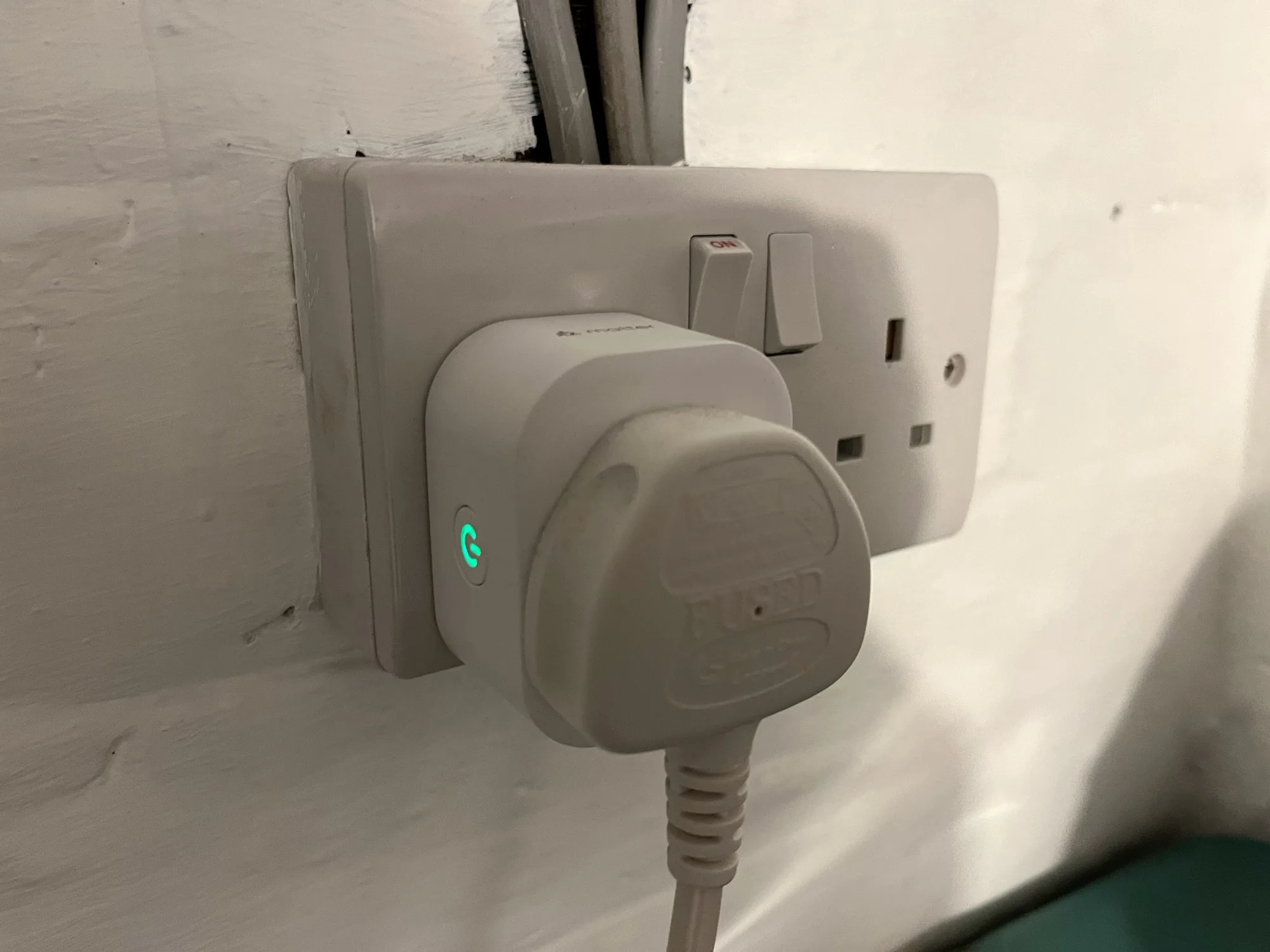
A photo of a Meross energy monitoring smart plug in a UK plug socket

Back in April last year, I bought a pair of Meross energy monitoring smart plugs (sponsored link). I’d chosen them because they supported Matter, and so could be easily added to Home Assistant, Google Home and Apple Home all at the same time. However, I lamented that their Matter support was limited to turning them on and off; the energy monitoring data wasn’t available through Matter. That has now changed.

If you have these plugs, or are looking at buying them, here’s how to get energy monitoring over Matter into Home Assistant:

Step 1: Update the Firmware

Firstly, you’ll need to open the Meross app on your phone, and ensure that the smart plug is linked to the app. Next, you’ll need to do a firmware update – this is located on the user tab, for some reason. The firmware update should take a couple of minutes.

A screenshot of the Home Assistant interface, showing the settings for the Meross energy monitoring smart plug and the 're-interview device' option.

Step 2: Re-interview your smart plugs

Originally, the way I found out that this was working was because one of my plugs had stopped working, and needed a factory reset. I then had to remove and re-add it to Home Assistant, Google Home and Apple Home. When I re-added it to Home Assistant, that was when I found that it now supported energy monitoring over Matter, as the power, wattage, voltage and current for the smart plug now appeared in the device settings.

The good news is that you don’t need to remove and re-add the device. Instead, you can ‘re-interview’ the device. Open it up in Home Assistant’s device settings, and then click the three dots next to ‘Share device’, and then ‘Re-interview device’. Home Assistant will then attempt to find out what capabilities the device has, and should add the new entities for you.

Step 3: Uninstall the Meross LAN custom integration

Now that Home Assistant can receive the energy monitoring data over Matter, you shouldn’t need the Meross LAN integration from HACS anymore. You’ll need to amend any existing automations that use the Meross LAN entities (I use this energy monitoring blueprint), and then remove the devices before uninstalling it through HACS. This was one of the integrations that was causing the biggest slowdowns in my Home Assistant, and it seems to be more responsive now that I’ve removed it.

The key advantage of using energy monitoring over Matter is that the data remains local to your home network. Otherwise, you’re sending and receiving data to Meross’ servers (unless you’ve managed to reconfigure them to use a local MQTT broker like Mosquitto). That also means that, if those servers go down or Meross withdraws support, you would no longer get energy monitoring data. Switching to Matter should therefore give your smart home system more resilience.

The Art of the Brick exhibition in Leeds

Various large animals made out of Lego at the Art of the Brick exhibition

A couple of weeks ago, we went to see The Art of the Brick, an exhibition of Lego sculptures by Nathan Sawaya which is currently visiting Leeds.

Sawaya is an American sculptor who primarily uses Lego to make his pieces. As you enter the exhibition, there’s a short film where you get to hear more about Sawaya and how he works, before you continue into several rooms with different Lego sculptures. Each room broadly has a theme.

Some are quite abstract – humanoid shapes, with a single colour of brick. But there are also animals – many life size – and some Lego depictions of famous sculptures like Michaelangelo’s David, or of paintings like Edvard Munch’s The Scream. Some sculptures are designed so that you can see inside them – most are hollow. Almost all of them are made using standard sized Lego bricks – there’s very few of the bespoke pieces you get in some official Lego sets nowadays.

At the end of the gallery is the ubiquitous gift shop, and also a huge pit full of Lego for little ones to play in.

For me, my favourite bit was the animals – the models are quite detailed, and are a bit like those you would see at Legoland.

It’s not a very big exhibition – we got around it in about an hour, and it cost us about £30 for the three of us. The exhibition has been on a world tour and only has Montreal, Marseille and Schenectady to go; it was in London last year. If you do decide to go, use the promo code AOTB10LEEDS to get 10% off. It’s around until the end of next month.

Miscellaneous notes on North Wales

This is the one final holiday post before I get on with writing about the other things we’ve done on this holiday. It’s a few assorted notes and observations from our time away.

North Wales is popular with dog owners

If you want to bring your dog on holiday, then North Wales seems to a popular choice. The cottage we rented was dog-friendly, with hard floors in most of the rooms, and in Llandudno we saw at least one hotel specifically marketing itself as dog-friendly. In fact, there was even a dog toileting area to the side. Alas, I didn’t catch the name of it, and can’t find it on Google Street View, but I think it was on Church Street.

We certainly saw plenty of people out and about with their dogs.

Charging our electric car wasn’t much of an issue

Getting a new electric car less than a week before we went on holiday was an interesting decision in retrospect, but we coped well. Whilst there are literally no public chargers in Conwy, and we weren’t permitted to charge it at the cottage we rented, there were a couple of rapid chargers a few minutes away in Llandudno Junction. These kept us going when we couldn’t charge on days out, however, several of the places that we visited did offer public charging. We only had to go out of way once to charge up; the rest of the time, we fitted our charges around the activities that we’d planned.

Signage is in Welsh first, then English

North Wales has a higher concentration of people who speak Welsh as their first language, than other parts of Wales. So, Welsh tends to appear first on road signs with English beneath. This isn’t universal, and elsewhere in Wales it’s English first. And whereas in Ireland, where the Irish text on road signs is in italics, both the English and Welsh are in the same font, same colour and not italicised. I don’t speak Welsh – I tried it on Duolingo for a couple of weeks before going back to French – and so reading signs took a little longer as I had to look where the Welsh stopped and the English started.

Christine, meanwhile, is still learning Welsh on Duolingo.

It’s also notable that all the Welsh signs instantly disappear as soon as you cross the border back into England.

The Welsh NHS is separate to the English NHS

I forgot to pack any spare hearing aid batteries, and so needed to find somewhere that sold them. Being English, I went to the nhs.uk web site to find somewhere that would sell them, but it turns out that, despite ending in ‘.uk’, nhs.uk is just the web site for NHS England. So when I searched for nearby pharmacies, for example, all the results were in Cheshire and Merseyside.

Healthcare is a ‘devolved’ matter in the UK, and so the regional governments in Wales, Scotland and Northern Ireland have their own branches of the NHS. (Technically, it’s not the NHS in Northern Ireland but HSC instead).

NHS Wales confusingly has two web sites. The main NHS Wales web site, at nhs.wales, is more of a corporate web site – if you want health advice, or to find services, you need NHS 111 Wales, which is at 111.wales.nhs.uk.

I know NHS England is being abolished but you would expect a web site called ‘nhs.uk’ to apply to the whole of the UK, and not just England.

For completeness, health advice in Scotland comes from NHS Inform, at nhsinform.scot, and in Northern Ireland, it’s part of NIDirect.

Our 2025 holiday: Chester Zoo

A pair of rhinos at Chester Zoo

This is the last of my blog posts about what we did on our summer holiday to Wales – bearing in mind we’ve been back for over six weeks. Our last stop was on the way home, and as with our visit to Beamish on the way home from Northumberland, not actually in Wales. This was a visit to Chester Zoo.

I last blogged about a visit to Chester Zoo in 2018, when I took our then two-year-old on a day out when Christine was working a weekend. We’ve been back many times since, despite it being over an hour’s drive away. Indeed, we had an annual membership for a year – unfortunately, that year was 2020 when the zoo was shut for several months due to the pandemic, although we still managed seven visits that year. Our last visit was almost exactly two years ago.

This year’s Chester Zoo visit was prompted by receiving gift vouchers at Christmas from my parents, who joined us this time. It had been much longer since they had last visited, and I imagine the zoo has changed significantly since then.

Heart of Africa

Our main focus for this year’s visit was the new Heart of Africa zone. This replaces an area of the zoo which was starting to feel a little run-down, and makes it more like the other newer areas of the zoo. The rhinos, painted wild dogs and meerkats remain roughly where they were before. The giraffes have moved to a new mixed savannah habitat here, along with zebras, ostriches and antelope. It’s definitely an improvement, and the animals feel more in context with themed surroundings. There’s also a mock-up of a lab, showing the work that zoo staff do to ensure the animals’ welfare.

Snow Leopards

Another recent arrival at Chester Zoo were a pair of snow leopards. We got to (briefly) see the male snow leopard, but the female is off show as she’s recently given birth to an adorably fluffy cub. These have a new purpose-built habitat in the older part of the zoo, near to the Red Pandas. Which were doing the usual Red Panda thing of sleeping in a tree, as it was a hot summer day.

Chester Zoo is huge, and even if you get there at 10am and stay until closing, it’s almost impossible to see everything in one day. As such, on this year’s visit, we prioritised seeing the new zone and specific animals that we enjoy seeing. Alongside the new zone is The Reserve, which is Chester Zoo’s first on-sight overnight accommodation for visitors and overlooks the savannah area with the giraffes, so you can extend your visit to two days.

Accessibility

Accessibility is reasonably good, although the site isn’t completely flat – thanks to Flag Lane, which is a public right of way that cuts through the middle of the site. There are two crossings of Flag Lane; the one by the elephants and nearer the entrance is best for wheelchairs. The other crossing, the Bat Bridge, is wooden.

Wheelchairs and mobility scooters are available to hire, and there’s a changing places toilet near the main entrance. Chester Zoo really want you to download their app, but I managed to find a PDF of the current map here – it’s very buried on their web site.

Chester Zoo is located next to one of Chester’s Park and Ride sites, and so you can get a bus from Chester railway station (this is what we did on our first visit as a couple in 2012). Ample parking on-site is available, and there are 20 medium-speed 7 kW electric car chargers close to the entrance. However, when we arrived on a busy summer Saturday, these had all been taken by 10:30am, and I had to pop back at lunchtime to move my car to a bay that had become free. They’re on the Pod Point network.

Cohhee Intelligent Battery Charger

A photo of a Cohhee intelligent battery charger

Today I’m reviewing this Cohhee Intelligent Battery Charger (sponsored link) that I recently bought from Amazon, to recharge my AA and AAA batteries.

This isn’t the first ‘intelligent’ battery charger that I’ve bought – I have an older one, but it could only charge pairs of batteries (not single batteries) and didn’t detect batteries that could no longer charge. This Cohhee battery charger doesn’t have these faults; you can charge single batteries if needed, and mix and match between AA and AAA batteries. And, it’ll tell you if a battery is unable to be charged anymore.

Charging is quite fast – about 5 hours for AA batteries, and two hours for AAA. There’s a screen along the top that shows the charging progress of each battery. It’s relatively compact, and doesn’t need to plugged into a wall socket. Instead, it’s powered by a USB-C cable. It claims to have over-charging and over-heating protection too.

Having used it for a couple of months, I’ve found that the batteries I’ve charged up in it last longer than before. That’s probably because it charges the batteries individually, rather than as pairs, and identified the dud batteries that I could then get rid of.

Its normal retail price is only £9, but it’s on sale for £8 at the time of writing. Batteries not included.

Our 2025 holiday: RSPB Conwy

A photo of some birds at RSPB Conwy

I’m almost done with our holiday posts – this is the penultimate one, and is about the RSPB Nature Reserve at Conwy. It’s relatively new, having opened in 1995, and exists because of the building of the A55 North Wales Expressway.

Tunnel spoil

When the A55 Conwy tunnel was built, the spoil created from the excavation needed to go somewhere. Major tunnelling projects often result in the spoil being used to create nature reserves: Samphire Hoe was created from the Channel Tunnel, RSPB Wallasea Island from the Elizabeth Line, and when HS2 is finished, it’ll result in new chalk grassland in the Chilterns. For the A55, the spoil was placed along the side of the Conwy Estuary, to create a new wetland habitat during the late 1980s and early 1990s.

Many birds have now made this wetland their home, and we saw plenty of white egrets, lapwings and whimbrels that you wouldn’t often see elsewhere. The site consists of two large lagoons, with paths and bird hides around them, although the smaller of the two lagoons was completely dry when we visited, as a result of the exceptionally dry summer that we’ve had this year.

A photo of a six-spot burnet at RSPB Conwy

Visitor centre

There’s a large visitor centre at the site, home to the shop as well as information about what you can expect to see. Obviously, the birds there are wild, and so nothing is guaranteed, but we saw a good variety. You can also pick up maps for the trials around the lagoons – we didn’t do the longest path, as we were just visiting for the afternoon. There’s also a café, plenty of places to eat a picnic, and a small playground.

One of the hides that we visited also had an extensive history of the building of the road tunnel, and how that led to the establishment of the nature reserve.

We had a nice, relatively peaceful afternoon at RSPB Conwy. There is the background noise of traffic on the A55, but it was nice to go somewhere with a slower pace.

Accessibility

The site is mostly flat, although the paths are mainly gravel, or wooden boards across the wetter areas. There are various colour-coded trails that you can follow, and the maps provide information about gradients.

Access to the site is from Junction 18 of the A55 – it’s directly connected to the roundabout here. Work was ongoing to improve cycle access when we visited, and it’s a about a half mile walk from Llandudno Junction railway station. RSPB members get free entry.

Creative Commons License
Except where otherwise noted, the content on this site is licensed under a Creative Commons Attribution-ShareAlike 4.0 International License.