
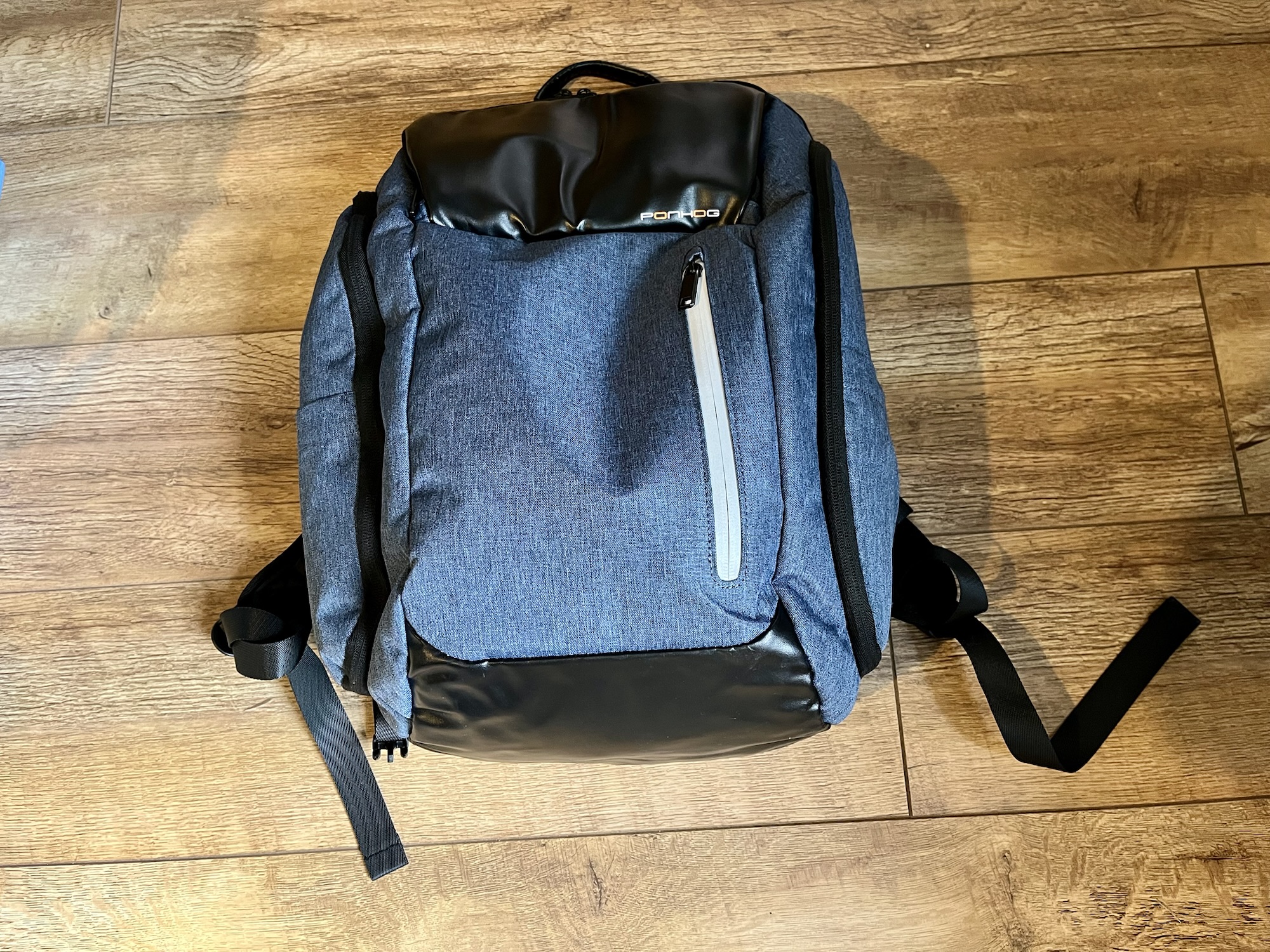
Ponhog laptop backpack review

A photo of the Ponhog laptop backpack

I was in need of a new backpack that can carry a laptop, and so I bought this Ponhog laptop backpack (sponsored link) a few weeks ago. Here’s my review of it, but firstly a bit of background.

I’m a hybrid worker, and when I go into the office I tend to commute by train. In the near future, I’m likely to need to transport my work laptop around more often than I do now. At present, I have a lightweight backpack designed for hiking and cycling, which can hold my iPad, my lunch bag, and not a lot else, so I have a separate laptop bag.

I’d rather not have two bags – I don’t want to be that guy who has to grovel to our IT department because I left the laptop on the train. So, I needed a backpack which could also safely transport a laptop, and this Ponhog laptop backpack seemed to fit the bill.

Overlooking the name ‘ponhog’

Firstly, I’d like to address the elephant, or rather, ‘hog’ in the room: frankly, I think ‘ponhog’ is a terrible name for a luggage brand. Whilst the word ‘ponhog’ itself isn’t in Urban Dictionary (a baseline test for any brand – looking at you, Nonce Finance), ‘pon’ just means ‘on’ and ‘hog’ means ‘pig’.

I don’t have any better suggestions myself, but I’m sure there are many potential brand names that are better than ‘Ponhog’.

The outside of the backpack

There are a number of different styles and colours available. I went with blue, which I mainly chose because I liked the colour, but it also appears to be cheaper than some of the others. The fabric feels like a plastic-y denim, which gives it some water resistance. It certainly hasn’t let in any of the rain that we’ve had in recent weeks whilst I’ve been using it, so that’s good.

There are five zipped compartments accessible from outside. There’s the big main one (more on this later), a smaller one which is behind some black shiny fabric, a small flat one on the front with reflective material, and two tall side compartments. I particularly like the side compartments, as I can pop a water bottle in one, and a reusable coffee cup in the other, and they can be completely enclosed inside. There are also two thin side pockets that don’t zip up, one on each side.

Inside the backpack

It’s possible to open the backpack so both the top and bottom of the main compartment are completely flat. Apparently this is so that you can have it open for inspection at airport security. There are Velcro flaps on each side that you can close if you don’t want to open it fully.

The main compartment is pretty big – it claims to have a 30 litre capacity. At the back are two padded pockets – a larger one for a laptop, and a smaller one for a tablet. A Velcro strap helps to anchor the devices in these pockets in place, although it doesn’t fit snugly around the device like some dedicated laptop bags do. As such, it’ll protect your devices somewhat, but not as much as one with a tighter strap. Also, whilst I could fit my iPad Air into the tablet pocket, I could only do so without a case on. But there’s plenty of room in the laptop pocket for a really chunky laptop and a larger tablet.

The front compartment with the black shiny fabric has four little sub-pockets. I like these – it means that I can sort the various gubbins I carry around with me into each pocket. This includes spare headphones, charger cable and plug, hearing aid batteries, a pen, some hand cream and a power bank. It makes finding things a lot easier, and it’s handy that it’s separate from the main compartment.

What it’s like to wear the backpack

All this would be for nothing if this backpack wasn’t comfortable to wear, so thankfully it is relatively pleasant to have on your back. Overall, it is heavier than my old backpack, which was made of much lighter material, but it also seems more waterproof. The back panel is made of a breathable mesh, and as well as the shoulder straps, there’s a cross brace so that you can transfer some of the weight to your ribcage.

The dimensions mean that it is (just) small enough to be classed as a ‘small under seat bag’ on airlines such as Jet2 and Ryanair, so you could have this in addition to your hand luggage that goes in the overhead locker. Indeed, there’s a strap on the bag that allows you to hook it on top of a rolling case, which is handy. I actually wish I’d taken this to Athens rather than a small tote bag, as it would have made packing to go home much easier.

Whilst I’m primarily using this bag for daily commuting, I can see it being very useful for international travel, should I need to fly somewhere again. I’ve had it for about six weeks as I write this, and have taken it to and from work a few times. Overall, I’m pretty happy with it; it’s the first time that I’ve bought a backpack online rather than in a shop where I can try it on first. So, I’m pleased that it’s been a worthwhile purchase.

Brain transplant

IDE #0 ERROR

Christine’s laptop has been a bit poorly lately. Before Christmas, it wouldn’t boot up – the ‘Starting Windows’ graphic would show and then it’d stop at BSOD with ‘Unmountable Boot Volume’ as the error. I was able to fix it by starting the computer in Windows Recovery Mode, opening a Command Prompt and using CHKDSK to sort out errors on the hard drive. That did the trick.

But this happened again last week. I did the same thing, but this time CHKDSK found a whole host of bad sectors. While Windows would then boot up afterwards, it was rather slow, and a white flag appeared in the bottom left of the screen, telling me that Windows was having problems with the disk. Not good.

Rather than risk any further disk problems, and Christine losing all of her files, I bought a new hard disk to replace the old one. I took the old disk out (thankfully not too difficult a task with her laptop – an Acer), and put the new disk in, then put the old disk in a USB enclosure. Next, I downloaded CloneZilla and burnt it to a blank CD, then booted the computer up using the CD and had it clone the old drive onto the new drive. I had to run it in ‘–rescue’ mode, as when I tried it with the default settings it failed when it hit the bad sectors. Copying the data took around 6 hours, as this was a 640 GB hard drive.

Thankfully, it was a success, and the computer now boots up and runs fine. The new disk is a 5400rpm 640 GB Samsung drive, which is of the same specification as the old disk – a Western Digital Scorpio Blue (which apparently isn’t very good). I did look at a 7200rpm drive, but would have needed to wait longer for it to be delivered – this drive was available immediately.

Having suffered from a major disk failure back in October 2004 (when some irreplaceable data was lost forever), I’m keen not to replicate the experience in a hurry.

What the cool kids are using

Side by Side

I don’t mention my job here much, mostly because the majority of the work that I do deals with confidential information about students and applicants. But today, for a change, I spent some time invigilating a group practical assessment for some of the science students, and the majority of students had brought their laptops with them (it’s ‘open book’, so they can use textbooks and the internet).

Whilst making sure that none of the students were cheating, it was also a chance to see what laptops and web browsers they were using.

Most students had normal sized laptops, but around a quarter had the smaller netbooks. The vast majority were running Windows Vista or 7. Three or four (around 5%) were Macs. There were also a couple of iPads, plus various students using the internet on their smartphones.

As for web browsers, Internet Explorer stuck out as the most popular, though at least everyone was using version 7 or later. Interestingly, Google Chrome was the second most popular, with a surprisingly high number – probably 15-20% of people. Remember, these students were studying science, but not computer science. Firefox was in third place, and I saw one Opera user too. Almost everyone had multiple tabs open; some had 5 or 6.

If this is a typical sample, then it may be that I’m underestimating how popular Google Chrome has become. It’s still quite new on the scene but its growth has been huge.

(Usual disclaimer: this does not necessarily represent the views of my employer, this data was not gathered using scientific methods etc.)

New laptop

I’m spending the weekend at my parents’ house in York and so my duties as the person who knows about computers come into play. This usually involves ensuring that all the software on my parents’ computers (a shared desktop and my dad’s laptop) are up-to-date, and fixing any problems that have arisen since my last visit.

This time, my dad has a new laptop.

I helped him buy it from Amazon. A Mac laptop was ruled out early on, since Apple don’t do an affordable MacBook with a reasonably large screen (this is something Microsoft touched on in a recent TV advertising campaign). He wanted something bigger than the 13″ screen that the MacBook comes without paying £1299 for the 15″ MacBook Pro, which would also have been overkill for what he needs it for.

So we were looking for something running Windows. I suggested waiting until Windows 7 had come out, so we did. I also suggested going for a computer with a 64-bit processor and the 64-bit edition of Windows 7. While it may result in some incompatibilities with very old software, I believe that we’re now at the tipping point where 32-bit computers and software will go out of fashion and only serve the low end of the market, with 64-bit machines taking over the mid-range. It also means that the computer would be upgradable beyond the 3 GB of RAM that it ships with.

Ultimately, he settled for a HP laptop from Amazon, costing £450. It has an AMD Turion II dual-core processor, 320 GB hard drive, Windows 7 Home Premium 64-bit, DVD Rewriter drive and a few other bells and whistles like a remote control for Windows Media Centre, an HDMI port and an eSATA port which also doubles up as a fourth USB port. In terms of ‘crapware’ it wasn’t too badly inflicted – an AOL toolbar and 60-day trials of Norton and Office 2007 – all swiftly removed.

For the anti-virus I gave Microsoft Security Essentials a go, and it seems to work well as a simple, unobtrusive anti-virus program. It may not have the fancy features that Norton and McAfee offer, or even some of the features of the likes of AVG and Avast!, but it seems to do the basics very well, without monopolising a significant amount of computer resources.

Buying a computer with Windows 7 pre-installed ensured that we avoided most of the potential driver faults, though it still seemed remarkably stable (so far). The refinements over Windows Vista are subtle, but welcome, and it’s definitely a leap forward over Windows XP. Installing a printer connected to another machine running Windows XP was as painless as it is on a Mac – all you have to do is tell Windows you want to add a printer, say it’s on the network and it’ll present it to you in a few seconds – and then it’ll download and install the drivers for you automatically. That’s how easy it should be.

Speed-wise it’s very fast. Obviously it’s fresh out of the box so no doubt it’ll slow down over time, but installing software and indexing photos have all been very quick, even when running 32-bit programs. I’ve not noticed any incompatibilities when running 32-bit software on it either.

I have to say I’m quite impressed at how good the machine is, considering the price, and Windows 7 is living up to some of the more glowing reviews I’ve seen of it. Still…. I think my next computer will be a Mac. As much as I like this laptop and Windows 7, I’ll stick with Apple build quality and design, which is still ahead of HP and Microsoft in my view. Not by as much, but still ahead.

It’s here

The MacBook is here, and currently downloading about 10 system updates. Unfortunately, I have an exam in 3 hours so I can’t play with it much, but for now I can say the following:

  • Wow, it’s so small and light
  • The battery seems to be charging up really quickly
  • I really wish my Mac Mini had an Apple Remote

More later (including photos), after I’ve spent 2 hours sat in a room writing about internet security and encryption protocols.

Officially an adult

It’s my 18th birthday!!!

Yup, I’ve turned the big 1-8 today. Marissa (my new laptop) is now up and running, though admittedly not under Windows. I decided to go ahead and install Mandrake 8.2, and I’m very impressed. The CD autoran in Windows, and gave me the option of either booting from the CD (didn’t work) or creating a boot disk and using that. Although the boot disk creation was a little difficult (I had to read the documentation to find out what to do), it was done quickly and I was able to boot into the installer.

The installer was great – the ‘express’ option take about 30 minutes and was nice and easy to understand – there was plenty of help available and no confusing dialogs. The partition manager was excellent, though I did have to say goodbye to Windows XP due to the fact that Samsung had chosen to use NTFS, which, although it is recognised by Linux, isn’t supported. But it is a new system so I wasn’t going to lose anything.
I’m using KDE as my desktop – not KDE3, since this isn’t yet included – but 2.2.2 (I think). It also comes with a full office suite, more web browsers than you can shake a stick at (including Mozilla, which loads much more quickly than its Win32 counterpart) and various other tools.

There are down sides – I couldn’t get the sound to work, and I won’t be able to use the internet for a couple of days until NTL get their act together (I’m on Marianna, the old machine), but on the whole, I’m pleased with what the Open Source community has done here.

My other presents included a laptop backpack – or rather the money for it, though I got one today from PC World. It’s great – not only will it carry the laptop but the transformer, extra mouse (which also works in Linux, despite the fact that it is USB and has a wheel) and Ethernet lead, and a great deal else. I also got a wallet (to complement my proof of age card, which arrived this morning – nice one, Portman Group) and more money. The rest of my presents will be here tomorrow when my grandparents and cousins come over for dinner.
Anyway, I’m off out for my birthday party. See you later!

Back online

Woo! I’m back online at home! The new 17” monitor is great – it is digitally controlled (as most are nowadays) and has a very sharp display. It looks good too. It’s made by Relisys – I don’t know if it is a good make or not but York Computer Clinic, who sold it to us, say it is a very good brand.

Although I won’t be allowed to use my laptop (when it arrives) until my birthday (darn parents), I have a new gadget for it – a USB->Ethernet adaptor. It means I can use one of its USB ports to hook up to the broadband connection, or, if I end up at UMIST, their internet system. It’s made by Linksys (who I gather are a good firm when it comes to connectivity products). So why didn’t I just get an Ethernet PCMCIA card? Well, although Computer Prices UK (the service I used to find my laptop) lists such cards at prices as low as £23.85, PC World were selling LinkSys cards for a hefty £69.99. This was only £39.99, and has the added bonus that it’ll work on any machine, whether it happens to be a laptop or not. Maybe what I read in the UK PC Magazine about the demise of PCMCIA was true…

The laptop, by the way, is due to arrive on Monday or Tuesday – Comet made a cock-up so they had no delivery address or time. Fortunately, a quick phone call sorted everything out. Buying online is great, when it works, and I think this is perhaps an example where it hasn’t quite worked. Incidently my mother’s credit card company actually rang her up to ask if her card had been stolen, since she bought both the laptop and our holiday (in July) on it, and thus was out of sync of her general buying profile. So a thumbs up to the Halifax Bank for keeping an eye on credit card fraud, even if it was a false alarm.

The computing project eventually got handed in on time; in fact the network server came back up shortly after I’d posted. So now all I have to do is revise for the exam on Monday, which hopefully shouldn’t be too difficult.

In case you’re interested, I’m using a new browser – Crazy Browser. It’s actually just another front-end for the IE HTML rendering engine, but offers many more features, and is very efficient – it doesn’t take ages to load or render pages, unlike Mozilla. Though I may take a look at version 1.0 when the final release is available and the debug code has been removed – and I still have RC1 installed.

In preparation for my laptop, I’m downloading the ISOs for Mandrake Linux 8.2 – after pressure from some of the people in , I’ve finally decided to venture into the world of Linux. Mandrake is supposedly the easiest to use (or at least to set up), and from experience I know that it can co-exist with Windows, so it’s worth a try. The first CD (the installation CD) has already been downloaded and burnt to CD, and I have 57% of CD2 (the supplementary CD). I’ll probably also get CD3 too, so that I actually have some programs to run; it includes StarOffice, which, along with Open Office, may be the program that pulls me away from the MS suites. Even with a student discount, £110 is still too much for Office XP.

Sorry for the long post – a week without blogging has given me too many ideas to post about 🙂 . See you later!

Creative Commons License
Except where otherwise noted, the content on this site is licensed under a Creative Commons Attribution-ShareAlike 4.0 International License.