Over the Christmas break, my iPhone would randomly decide that I was in my office. I’d have an app open that used my location, but instead of showing me where I actually was, it’d suggest that I was in Bradford. Which isn’t so useful when, in reality, you’re at home, or in York.
It caused particular problems when using Google Maps for directions, as it’d randomly jump to Bradford and then back again. Swarm was basically unusable. And it completely broke the ‘Track Exercise’ function of the Fitbit app. I had to actually uninstall and reinstall the Fitbit app a couple of times because it wouldn’t let me stop the exercise. This was even after restarting the app.
Turning Wifi off helped. Apple’s iPhones, and indeed many other devices, use the SSIDs of available Wifi networks to approximate your location. This is done by querying a web service, which means that you can still get an approximate location even when indoors, and out of view of GPS satellites. But turning off Wifi was hardly a long term solution.
How to actually fix the location problem
A bit of Googling uncovered this article about fixing your location. It offers several solutions, depending on whether the issue affects just one application, or all. In my case, it was all applications, and the solution that worked was the fifth on the list. This involves resetting your phone’s location and privacy settings.
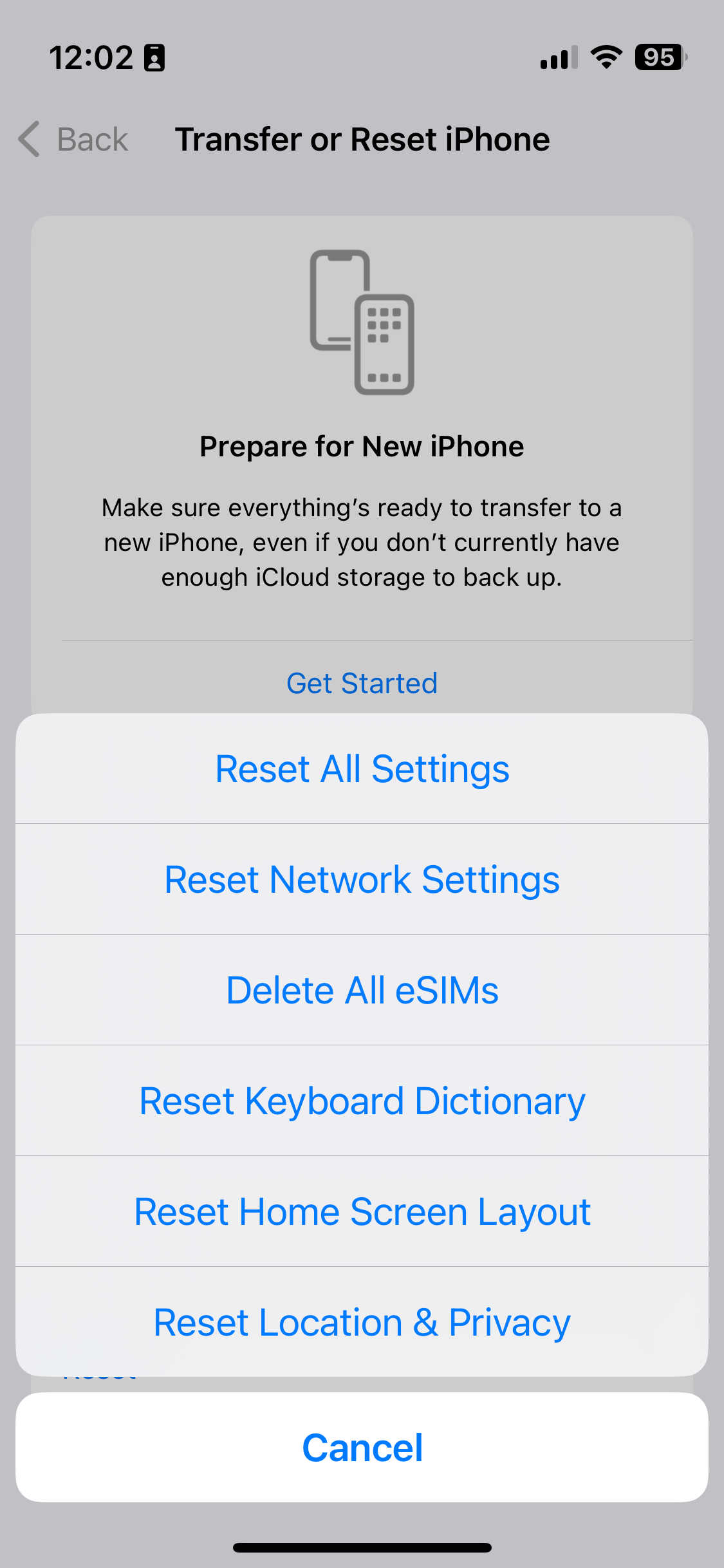
To do this, open Settings, and choose General. Then, scroll right down to the bottom and choose Reset, then select ‘Reset Location & Privacy’ – on iOS 10.2, this is the last option. Your device will ask you for your unlock password – pop this in, confirm, and hopefully your device will get the location correct from now on.
There is a drawback to doing this, however. You’ll have noted that this resets both your location and privacy settings. This means that any apps that you have granted access to your contacts, photos, calendars, camera, microphone, media library and so on will need to request them again. Although, oddly, apps will retain their location permissions, along with any permissions regarding background app refresh, notifications or mobile data access.
Despite these issues, it was a relief to fix the problem.
This blog post was updated in November 2023 with an updated screenshot, but the instructions are broadly the same.
It probably won’t surprise you that I’ve spent quite a bit of the last week playing Pokémon Go. I downloaded it within hours of its official UK release; the screenshot shows how far I’ve got, and overall, I’m level 11. This is mostly through capturing Pokémon on the way to and from work, and on my lunch break.
Christine has been playing it a little longer. She has an Android phone, and so she was able to sideload the APK file from a third-party web site prior to its official release on the Google Play Store. She’s therefore slightly ahead of me, and has had the benefit of being on maternity leave to have more time to catch Pokémon.
I’m enjoying it, although it is further exacerbating my iPhone’s battery issues. As I write this, Pokémon Go has used 51% of my battery over the past 24 hours. Even before last week, I was struggling to get through a full day on one charge. To be fair, I use multiple Bluetooth devices with my phone, and use it on a train journey with frequent tunnels. So my iPhone’s battery was already getting a strong workout even before I started playing. But, notice how my phone was already down to 61% before 9am in the screenshot.
I haven’t added any Pokémon to gyms yet, and have only played a couple of battles. I’m waiting until I’ve collected more, and had the chance to upgrade or evolve them. Many of the nearby gyms have Pokémon with combat power over 1000 already, and my best is under 800.
It’s been fascinating to see how much of a phenomenon Pokémon Go has become. It’s already outperforming many other social apps, including Twitter and Tinder, in terms of how long people use it. And the news has been full of stories, both good and bad, about the game and its players. I never played Ingress, its spiritual predecessor, but I had friends who did. It seems that Niantic, its developer, has found the perfect balance between Ingress’ gameplay, and the popularity of the Pokémon franchise.
I don’t know how long I’ll keep playing. At the moment I’m still discovering new Pokémon and enjoying levelling them up – even if I’m sick of always finding Drowzees everywhere. Maybe the game will become less fun or stale after a while, but at the moment I like it.
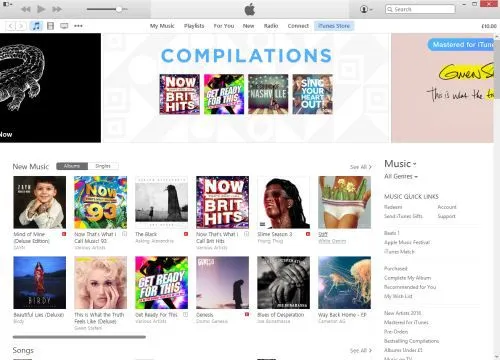
iTunes. It’s the software that many of us use begrudgingly for listening to music, purchasing content, syncing with our devices and watching videos. Mac users get it as part of OS X, whether they want it or not, but Windows users need to download it, to be able to synchronise their music libraries with their various iDevices.
To find out how iTunes came to be the bloated mess that it now is, we need to look back into its history.
A brief history of iTunes
iTunes has not always been called iTunes. Way back in the late 1990s, it was called ‘SoundJam’, and was written by an independent third-party developer for the original Mac OS System 9. Apple later bought out the developers, releasing iTunes 1.0 in 2001, which built on SoundJam’s features and added the ability to burn CDs with tracks from the user’s library. Fundamentally, the basic music management features of iTunes are largely unchanged in 15 years.
iTunes 2.0 was the first release for Mac OS X, and the first to support Apple’s brand new music player, the iPod. This took iTunes from being an application that simply managed music on your computer and your CDs, to your iPod as well.
Version 4.0 and 4.1 were big steps forward for iTunes. Version 4.0 brought the iTunes Music Store (later just the iTunes Store when it expanded to other content), and 4.1 brought iTunes to Windows for the first time. Adding the iTunes Store added another layer of complexity to an application that already did quite a lot of different things.
As Apple improved its iPod range, iTunes had to keep up. So the 2004 launch of the iPod Photo, with a colour screen for showing photos, saw photo syncing added to iTunes 4.7, and the launch of the fifth generation iPod Classic in 2005 meant that iTunes would gain support for video playback. By now, it was possible to use what was originally a program for managing music, to manage your movie and TV show libraries as well. Podcast support arrived in version 4.9.
2007 brought the first iPhone. Up until 2011’s release of iOS 5, iOS devices relied on iTunes for various tasks like software updates and backups, and so all of this had to be handled in the app as well. Ultimately, this led to a major redesign of the iTunes interface in 2012 (version 11), but it retained its underlying code and all of its numerous existing features. And iTunes 12 saw Apple Music, its new streaming service, bolted on to iTunes.
So what is iTunes now?
We know what iTunes was, when it first came out 15 years ago: a music library management program that let you play music, and import and export tracks to CDs. Its feature set has since ballooned into:
an all-encompassing media and app store
music and video player
podcast manager
internet radio player
streaming music service
CD ripper and burner
mobile device sync and backup tool
online music storage manager
All of these are rolled into one, monolithic app, which is supposed to run on both OS X and Windows. Whilst Apple controls OS X and iTunes’ integration with it, the Windows version has developed a reputation for being slow and a pain to update. iTunes for Windows actually includes a number of helper utilities (Apple Mobile Device Support, Bonjour, Apple Software Update and others) and I’ve lost count of the times when I’ve tried to update iTunes on Windows to find that the installation failed. Sometimes, you just have to uninstall and reinstall everything, which is time-consuming and far from ideal for a piece of software that is updated on a near bi-monthly basis. I wouldn’t be surprised if many Windows users still have old versions, due to updating issues.
What can Apple do to make iTunes better?
In my view, Apple needs to take a look at what it has done on iOS. There’s no monolithic, all-encompassing ‘iTunes’ app — instead, its individual functions have been broken down into multiple apps. Here’s how iOS does it:
Music — this handles the music you own (in your iTunes library) and Apple Music.
Videos — playback of videos in your iTunes library is handled by a separate app.
Podcasts — again, podcasts have their own app. This was baked in to the Music app in earlier versions of iOS, but was later spun-out and it now comes as standard.
iTunes Store — the store is a separate app; once you buy something, playback is handled by the Music or Videos apps.
App Store — apps for iOS devices are bought separately from audio and video content.
Settings — handling your settings is done in the main iOS Settings app.
So I suggest that Apple splits iTunes on the desktop into the following:
iTunes Music — a music player that takes iTunes back to its roots. It’ll handle all aspects of playing music — whether this is from your own library, a CD, Apple Music or internet radio. CD burning can go in here too.
iTunes Video — this could replace Apple’s QuickTime player, which hasn’t seen much development in recent years. It can handle the playback of video content from your library — whether that’s films, TV shows, or home movies imported from iMovie.
iTunes Podcasts — a separate podcast manager, like on iOS.
iTunes Store — like on iOS, the store app is kept separate. When an item has downloaded, a single click would allow users to open the content in either the music or video player, where applicable, or in a third-party player if Apple wants to play nice.
Apple Sync Settings — on a Mac, this could be an additional preference pane in System Preferences. On Windows, I would have previously suggested a new Control Panel applet, but I gather such things have been phased out in Windows 10 and so this would have to be a separate app. This would handle the synchronisation of data between your computer and Apple device (a modern-day reincarnation of iSync), so you can choose what is copied across and handle backups and software updates.
A simple onboarding splash screen could help users find out where things have moved to when they upgrade.
What else needs to change?
Splitting iTunes up into several component apps will hopefully make it faster (less code to load into memory) and easier to use (less features to cram into a single interface). I also hope that doing this would improve the Windows version, which has never been as slick as its Mac counterpart.
But one other thing that Apple needs to change is the incessant prompts for your AppleID password. Some of these make sense — unless you turn it off, you’ll be prompted every time you buy something, and that’s fine. But sometimes I get asked for my password for no discernible reason. This came to a head last week when my AppleID was locked due to ‘suspicious activity’ on my account — which was me renaming my iPhone to ‘Phoney McPhoneface’ — yeah, I know. This led to at least four prompts to enter my (18 character) password on my phone, and iTunes asked for it twice. In all of these situations, I entered the password correctly, so why all the prompts?
I’m sure there are many more ways that Apple can improve iTunes. The change I’ve suggested here is a major one, and would probably be the biggest shake-up since its launch in the 1990s. But I honestly think that it would make a major difference to iTunes’ many millions of users around the world.
The four hour session, split into two halves, was chaired by two members of the House of Lords, Lord Inglewood and Lord Witty, and the speakers represented various users of big data in the UK. These included the ABPI, whose members carry out research and development into new medications, Dunnhumby, who worked with Tesco to launch the original Clubcard in the 1990s, academics and industry partners.
The talks given by the speakers were interesting, and focussed more on policy and high-level overviews, rather than technical details. For example, whilst Hadoop was passively mentioned on some slides, there wasn’t much about deployment and how it works. But there was some discussion about database design, as companies move away from traditional relational databases to big data capturing solutions.
Privacy implications came up several times as well, an irony not lost on one of the speakers who noted that the event coincided with Data Privacy Day. In particular, there was a focus on how to design systems with privacy in mind, but also that the UK’s and Europe’s more restrictive privacy laws may be part of the reason why the world’s biggest data users – GAFA (Google, Apple, Facebook & Amazon) – are all based in the US.
I came into the seminar essentially wearing two hats. My main reason for attending was as a blogger (or ‘freelance writer’ according to the attendance list), but data analysis is also one of my roles at work. However, we’re not yet at the stage where we’re using ‘big data’ – most of our data is all within standard relational databases and I can’t see that changing any time soon.
As always, such events also offer a chance to network and it was good to speak with some of the other attendees. As you’d expect from a more high-level seminar, this was an event for people with suits and ties, and not t-shirts and hoodies. Many were from government departments, regulators and other public sector bodies, as well as large organisations such as the BBC and Arqiva.
I came away with plenty of notes, and some action points to perhaps bring up at work. Channel 4’s Viewer Promise video was mentioned as great example of best practice for explaining their privacy policy – far better than pages and pages of legalese. Maybe universities could do something similar to explain the student contract at enrolment.
This day was made possible by Dell, but all thoughts are my own.
I’ve written another post on Medium. It’s just a short two-minute read, but covers an issue I’ve been experiencing in iOS as I’ve amassed more Bluetooth devices: how on earth do you work out which one is which when they’re all called things like ‘SE50’ and ‘MM256’?
I’ve chosen to post it on Medium in the hope that it might get exposed to a slightly larger audience than usual. I think my previous piece on Medium got a little more exposure than it would have done normally – it didn’t exactly ‘go viral’ but I get the impression that more people saw it than if I had just posted it here on my blog.
If you enjoy my Medium pieces, then please ‘recommend’ them.
How many Bluetooth devices have you paired with your iPhone or iPad? Go on, have a look.
Okay, now go through each device and tell me what each one is. Because, if your list is anything like mine, you’ll struggle to identify each device from its name.
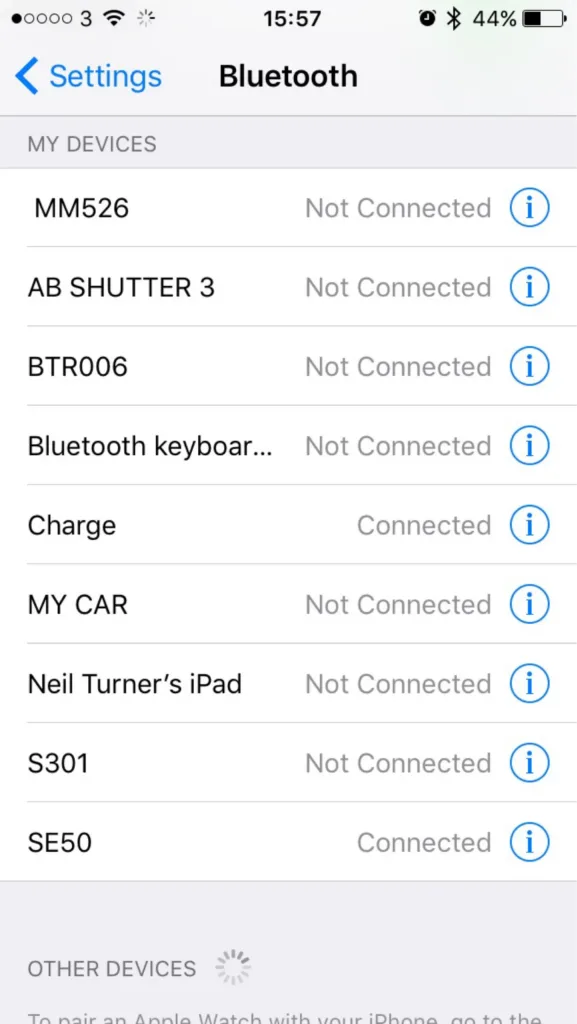
For reference, I’ve included a screenshot of the nine devices that are paired to my iPhone. In that list, there are:
Three Bluetooth speakers
One set of Bluetooth headphones
A Bluetooth camera remote
My iPad
A Bluetooth keyboard
My Fitbit
My car radio
The iPad is obvious, as is my car stereo and the keyboard. My Fitbit appears as ‘Charge’ as it’s a Fitbit Charge, and the camera remote is called ‘AB SHUTTER 3′ – close. For the remaining devices, without knowing the model numbers, or a process of trial-and-error, deducing which is which presents a challenge.
My iPad lets me change the name that appears to other devices, as do most phones or computers. But a cheap off-brand Bluetooth speaker doesn’t, especially as there’s no visual interface. Sure, you could probably re-program the device if you took it apart and hacked the firmware on the Bluetooth controller, but that’s beyond the capability of your average user.
It would be nice if users could assign a friendly name to these devices. ‘Waterproof speaker in shower’ is more meaningful to me than ‘MM526′. ‘MY CAR’ is all well and good but what if I had two cars?
It wouldn’t need a major change to the user interface of iOS. There’s already an ‘i’ icon next to each entry on the list – presently, this goes to a mostly blank screen with just a ‘Forget this device’ button. An extra field to add/edit a friendly name for the device is all that would be necessary. Doing so would improve the usability of Bluetooth on iOS significantly.
With the Emoji keyboard enabled, it would even be possible to add a pictogram to each friendly name. Instead of ‘MY CAR’, I could have ‘🚘 My BMW’, for example.
I understand that users with jailbroken devices can already do what I’m proposing. But jailbreaking isn’t an option for many, and so I’m hoping that someone at Apple will consider adding it for all users.
With iOS 9 now out, Apple must be planning for iOS 10 – this would be a really helpful little feature to include. I’m no programmer, but I can’t see it being too difficult, and it would be a small win for usability. How about it, Apple?
On Sunday last week, I packed my Mac up ready to move to our new house. 10 days on and it’s still packed up.
The main reason is that my computer desk will be in the dining room and we haven’t painted all of the walls in there yet. I’d rather not unpack my computer until the painting is done so that I don’t damage it, but it’s going to be a week or two before we’re at that stage. So, in the meantime, my computer stays in its box.
What surprised me is how well I’ve been able to manage without it. Normally my Mac is on all the time, and although I put it to sleep when I’m out, I usually use it every day before and after work. But I’ve been mostly coping fine with my iPad and iPhone instead.
95% of what I do on my Mac, I can do on my iOS devices. The main things I use a computer for are social media, reading feeds and articles, email, a bit of photo editing and playing World of Warcraft. Most of these things can be done on my iPad or iPhone as easily as they can on my computer.
Obviously I haven’t been able to play World of Warcraft in that time, and I’ve had to put off editing photos for now. Writing blog posts is possible on my iPad but it’s not as easy as on a proper computer. But I’ve been pleasantly surprised at just how replaceable my Mac has ended up being.
We also haven’t unpacked the TV for similar reasons. Watching Saturday’s episode of Doctor Who on my iPad wasn’t as great as it would’ve been on a proper TV, but it was acceptable.
Eventually we’ll have all of the painting done and we can go back to having a TV and desktop computer and be a normal household again, and I’m looking forward to it. But it’s not been nearly as disruptive as I’d expected it to be.
I wear a watch on my right hand – even though I’m right-handed. It’s not a fancy watch – it’s analogue, and as well as telling me the time it also shows the day of the month (although it’s usually wrong). It doesn’t automatically adjust for daylight savings time, or have alarms. It doesn’t even have a stopwatch, which means that I, ironically, have to use my phone as a stopwatch, rather than my watch.
But it’s simple, and in the 3-4 years I’ve had it, the battery has only had to be replaced once after running out of charge. It doesn’t need charging, updating or to be in range of another device.
Yesterday Apple finally announced pricing and a launch date for its new smart watch. Brits can expect to pay £299 for the most basic model, with more expensive models available at prices that make my inner Yorkshireman cry. It can do all sorts of things, like display text messages, make and answer phone calls, manage your calendar, display maps and monitor your fitness, and you can install third-party apps to make it do even more. It’ll even work as a watch and display the time – which is kept up to date from internet time servers.
Which sounds all rather flash. But I won’t be buying one.
Having a smartphone has changed my life – indeed, I’ll soon be facing a week where I’ll have patchy internet access and I’m already trying to work out how I’ll manage. But I don’t think I need yet another device that does the things my iPhone can do.
And the battery life is a concern – it’s estimated to last 18 hours, so I’d need to charge it up every night. A big change from my current watch that needs a new battery every few years.
I’ve yet to be convinced about the need for a smart watch, but I’ll try to retain an open mind. I’m sure Apple will sell millions regardless.
Later today I will have a brand new iPhone 5S, which I ordered on Friday. I wasn’t expecting to need a new phone so soon but sadly my current iPhone 5 is not in a good way.
The need to upgrade
I bought my iPhone 5, along with a new two-year contract, in September 2012, shortly after launch. My iPhone 4 had pretty much conked out: it kept randomly rebooting, and was getting rather slow. However, by September 2014, my iPhone 5 was still in good shape. Sure, the battery life wasn’t as good but it still worked fine. So instead I took out a new 12 month SIM-only contract with the intention of keeping my iPhone 5 until next year.
Unfortunately, more recently, my iPhone 5 has developed a fault with the Lightning port. It will only charge if I plug a cable in at a certain angle – and if the cable becomes even slightly loose, it won’t charge. Whilst I can usually get the cable in a good enough position to charge it at home, it’s almost impossible to do when out and about unless you actually hold the cable in position. And there have been several occasions when the cable has been knocked slightly and I’ve ended up starting the day with a phone on 30% battery.
It’s been like this for a while but it seems to have got worse of late. I’ve tried cleaning out the Lightning port as best I can, and I’ve used many different cables, but it still doesn’t work properly.
It may be fixable, but as the battery life isn’t great either, I decided that really, I’d be best with a new phone.
Rule-breaking
Co-incidentally, I recently received an ‘exclusive’ offer from Three, the network I’m with, to upgrade early to a new iPhone 6. Normally ending my contract now, and not when it ends in September, would incur a penalty, but Three were willing to waive these charges if I signed a new two-year contract with them. I registered my details on their ‘rulebreakers’ page and got a call back later on Thursday to discuss the deal.
The offer was for a brand new iPhone 6, in my choice of colour, at no up-front cost, with a 2-year contract that included 2 GB of data (including tethering), unlimited calls, unlimited text messages and a few other perks. The catch was that the monthly charge would be £46 per month, and it was only the 16 GB model. I’m currently paying £18 per month for a SIM-only deal so this would be a huge hike in my monthly payments – more than 2.5 times higher.
But I agreed to it – I needed a new phone, and I’d be getting Apple’s latest and greatest model. Even though I had the opportunity to home test an iPhone 6 in September, and found it rather too big for my liking.
Cutting too many corners
At first, I didn’t think the lack of storage would be an issue. My iPad Mini 2 is the 16 GB model, and whilst I don’t have much space left on it, it does just about everything that I need it for.
My iPhone 5, however, is the 64 GB model. And it turns out I was using half of the space on it. At first I thought these were things I could do without – a 2.5 GB full HD quality episode of Sherlock, for example. But after deleting the stuff I didn’t use, and then the stuff I occasionally used, and then stuff that I didn’t really want to delete but would do if I absolutely had to, I was still using over 20 GB of space. Essentially, if I wanted to get by on a 16 GB phone, I’d have to make do with not having all the apps I wanted, all my photos, or all of my music. And it’d be a compromise that I’d have to live with for the two years of the contract. A contract that would be costing me over £1000 over the two years.
The lack of storage might not have been so bad if it weren’t for the limited data allowance as well. Whilst I’ve only ever used more than 2 GB in a month once or twice, if I have less storage capacity on my phone then I’d need to store more data in the cloud, which would eat further into my data allowance. A small capacity phone and unlimited internet might have worked, as would a large capacity phone and limited internet, but not the worst of both.
Cooling off
I’m fortunate, in some respects, that I’d agreed to this over the phone, which meant that I was legally entitled to a 14-day ‘cooling off’ period, as per the Consumer Contracts Regulations. And in fairness to Three, they made me fully aware of my rights to cancel on the phone call and what to do. So on Friday I called them, and cancelled the upgrade, which was done without any fuss. After all, I’ll still have a contract with them until September. The iPhone 6 had already been dispatched at this point, so I’ll need to refuse the delivery when it comes today.
With that sorted, I ordered a new 32GB iPhone 5S direct from Apple. Whilst not as big as my current 64 GB model, I can comfortably get by with 32 GB of space – and Apple doesn’t offer larger storage on the 5S anymore. It cost £499, which I can pay off from my credit card over the next few months, and even with a bit of interest, it’ll save me around £180 over two years, assuming that I stay on an £18 per month contract. And the phone is unlocked too – whilst I’m happy with Three and don’t intend to switch networks, if I do, then I can take my phone with me.
I also prefer the size of the iPhone 5S to the 6. I’m not bothered about a bigger screen and would prefer a device that I can use with one hand, for the times when I’m standing on a train and need to hold onto a grabrail, for example. Whilst it is last year’s model, Apple tend to offer updates for 3-4 years after release, so it should be good until September 2018. And there aren’t many other improvements to the iPhone 6 that are relevant to me: I don’t have any 802.11ac wifi devices and Apple Pay hasn’t been launched here yet.
With hindsight I should have turned down the ‘rulebreaker’ deal in the first place, as soon as I heard it was a 16 GB model, but I guess desperation got the better of me. I’m fortunate that I’ve been able to cancel without penalty, and been able to find a solution that serves me better. Even if it does mean using last year’s model.
It’s almost August, so I’m within a couple of months of my initial 24 month mobile phone contract with Three coming to an end. I bought my iPhone 5, along with a new contract, in September 2012.
At the time I decided to go for a new contract because my current phone at the time, an iPhone 4, was not in a good state. It would randomly reboot around once a week, and sometimes when it came back up it would ask to be connected to iTunes, as if it hadn’t been activated. The battery life was starting to get rather poor by this point as well. Rather than spend money on a new battery and hope that it would also fix the reboot problem, I decided to take advantage of the launch of the iPhone 5 and just get a new phone. And because iPhones are so expensive when bought without a contract, I took on a new two year contract at the same time.
This time, my iPhone 5 is in a better state by comparison. Admittedly it too doesn’t have the same battery life as it did when I got it, but that is to be expected, and I have backup batteries in both my usual bags to top it up if needed (which actually isn’t that often). It’s as reliable as it was when I got it, and thanks to the improvements in iOS 7, it’s more useful now than it was two years ago. And iOS 8 will hopefully make it even better.
So, unless the rumoured iPhone 6 is amazing and has must-have features, I’ll sit it out and stick with my current model for the next twelve months. Not only will I not have the upfront cost of a new handset but a SIM-only contract will be much cheaper – around £14 per month instead of the £34 per month I’m paying now, saving me £240 over the year, or £5 per week.
Christine is in a similar position with her phone as well, so hopefully between us we’ll have the capacity to save quite a bit of money over the next year. There’s no point having the latest and greatest model if the current one works fine, and does everything I need it to. I’d rather have the extra money.