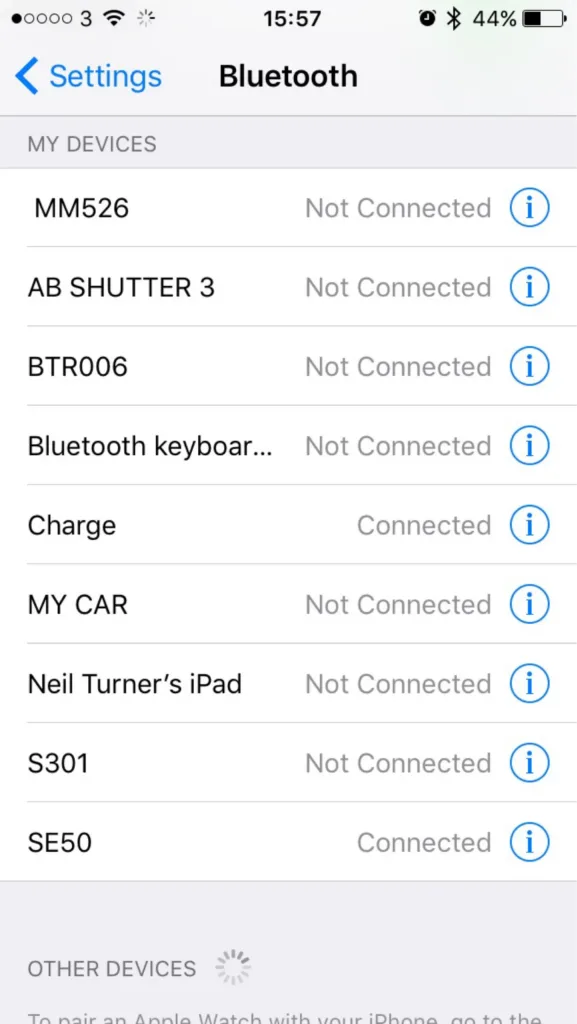
How many Bluetooth devices have you paired with your iPhone or iPad? Go on, have a look.
Okay, now go through each device and tell me what each one is. Because, if your list is anything like mine, you’ll struggle to identify each device from its name.
For reference, I’ve included a screenshot of the nine devices that are paired to my iPhone. In that list, there are:
- Three Bluetooth speakers
- One set of Bluetooth headphones
- A Bluetooth camera remote
- My iPad
- A Bluetooth keyboard
- My Fitbit
- My car radio
The iPad is obvious, as is my car stereo and the keyboard. My Fitbit appears as ‘Charge’ as it’s a Fitbit Charge, and the camera remote is called ‘AB SHUTTER 3′ – close. For the remaining devices, without knowing the model numbers, or a process of trial-and-error, deducing which is which presents a challenge.
My iPad lets me change the name that appears to other devices, as do most phones or computers. But a cheap off-brand Bluetooth speaker doesn’t, especially as there’s no visual interface. Sure, you could probably re-program the device if you took it apart and hacked the firmware on the Bluetooth controller, but that’s beyond the capability of your average user.
It would be nice if users could assign a friendly name to these devices. ‘Waterproof speaker in shower’ is more meaningful to me than ‘MM526′. ‘MY CAR’ is all well and good but what if I had two cars?
It wouldn’t need a major change to the user interface of iOS. There’s already an ‘i’ icon next to each entry on the list – presently, this goes to a mostly blank screen with just a ‘Forget this device’ button. An extra field to add/edit a friendly name for the device is all that would be necessary. Doing so would improve the usability of Bluetooth on iOS significantly.
With the Emoji keyboard enabled, it would even be possible to add a pictogram to each friendly name. Instead of ‘MY CAR’, I could have ‘🚘 My BMW’, for example.
I understand that users with jailbroken devices can already do what I’m proposing. But jailbreaking isn’t an option for many, and so I’m hoping that someone at Apple will consider adding it for all users.
With iOS 9 now out, Apple must be planning for iOS 10 – this would be a really helpful little feature to include. I’m no programmer, but I can’t see it being too difficult, and it would be a small win for usability. How about it, Apple?
This post originally appeared on Medium.