I’ve bought myself a new Bluetooth label printer – it’s this Etikez PM260 Label Printer(sponsored link).
But wait, you may think, don’t you already own a Bluetooth label printer? Yes, I do, and I reviewed that one a couple of years ago. And, despite buying this new one, I still use the previous one more frequently! I’ll get onto why in a bit, but first let’s outline the ways in which this Etikez PM260 model is better:
It supports larger labels. It comes with 30x40cm labels, but can support 50x80cm portrait labels.
As well as connecting to mobile devices via Bluetooth, it can also plug into Windows PCs and Macs via a USB-C cable.
You can do mail merges from Excel spreadsheets.
There’s a wider variety of label designs, including clipart.
It’s mainly the first three reasons why I bought the Etikez PM260. I wanted to be able to print labels easily via a mail merge, so that I would be more likely to actually send Christmas cards this year. And yes, I’m aware that posting about Christmas cards in March is a weird flex, but I’ve already had a chance to use it for something else. Namely, our ten-year-old’s birthday party invitations. I drew up a list of names in an Excel spreadsheet, and then we designed the invitations in Word, and used Word’s mail merge feature to print the invitations. Then, we used the Labelnize app on Windows to design the labels, and imported the names for the labels from the same spreadsheet. As well as installing the Labelnize app, there are printer drivers to install.
It worked reasonably well, although for some reason the printer only printed on every other label. In other words, after printing 10 labels, we ended up with 9 blank ones interspersed. I was able to re-stick the labels onto the backing roll to use again, and I hope this was a one-off, otherwise a roll of labels will last half as long. The labels print quickly, as it uses thermal printing rather than ink or laser toner.
What’s less good about it
For day-to-day use, we still use the Phomemo D30 printer. It’s more basic and can only print text and emojis, albeit in a variety of fonts. But it’s much quicker to use. By contrast, the Labelnize app for the Etikez PM260 is much more powerful, but you have to choose a design for each label, or design your own. It’s therefore not as quick to use as the Print Master app for the Phomemo printer.
The Phomemo printer is also quite a bit cheaper – currently it’s £16, as opposed to £27 for the Etikez PM260 – and it’s smaller. Both have a built-in battery, although the Phomemo printer should have slightly longer battery life.
If you don’t own a label printer at all, then the Etikez PM260 definitely offers more features, and overall gets my recommendation. But both printers have their place, and we use them both regularly.
Hopefully, this means I’ll have less of an excuse not to send Christmas cards this year!
Yesterday, we trooped off as a family to watch the latest Disney Pixar film, Hoppers. This is Pixar’s 30th feature film, and the 19th one I’ve seen. Generally, we look forward to Pixar films, and this one didn’t disappoint.
I’ll be honest: when I first saw the poster, I thought it was a film adaption of the French series Grizzy & the Lemmings. It’s not – for a start, the protagonist is a beaver, not a lemming.
Plot
The story focusses on a rebellious girl named Mabel, who wants to protect a picturesque glade in her home town of Beavertown. The town, led by Mayor Jerry Generazzo (voiced by Jon Hamm) has cleared the glade of animals, ahead of the construction of a new motorway. Mabel discovers that one of her university lecturers, Dr Sam Fairfax, has developed technology that allows people to ‘hop’ inside realistic animatronic animals. So, she steals an animatronic beaver in the hope that she can re-establish a beaver colony in the glade and stop the road. Along the way, she meets the King of the Mammals, the council of other animals, and sets herself up for a showdown with the mayor.
Besides Jon Hamm, Meryl Streep also has a cameo role, as do Alan Carr and Amanda Holden in the UK release.
My review of Hoppers
So, what did I think of Hoppers? Pretty good on the whole. I mean, it’s a Pixar film, and Pixar films are rarely bad. There’s a good mix of humour and sad bits, and the story isn’t wholly predictable. It’s not the emotional roller-coaster that a film like The Wild Robot was, but it’s fun. It’s certainly a good family film, and there’s a revelation at the end that made me laugh out loud (no spoilers). The three of us all enjoyed it.
We saw at The Light cinema in Bradford (my second favourite cinema chain), and with it having only opened fully in the UK on Friday, it was relatively busy. Thankfully, the days where Pixar films came out in the UK months after the US are gone.
Somewhere that we go to regularly, but I have hitherto not blogged about, is Heaton Park in Manchester. It’s the largest public park in the north west of England, and, being in the north-east corner of Manchester, it’s only about half an hour’s drive from us.
To give you some idea of how big Heaton Park is, it effectively spans junctions 17, 18 and 19 of the M60 motorway. Indeed, depending on which of its multiple car parks you use, you may end up leaving the M60 at either junction 17 or 19. Its large size means that there are plenty of things to see and do inside the park.
History of Heaton Park
Heaton Park is the parklands surrounding Heaton Hall, which was built in the late 18th Century and remains to this day. Whilst originally in private hands, the park and hall transferred into public ownership in 1902, and has been open to the public ever since. The hall is Grade I listed, and is occasionally open to the public. Here’s a video of the inside.
The parklands were laid out with a lake and pleasure grounds whilst still in private ownership, and these remain today. There are a number of other listed structures and monuments across the park, including the colonnade from the original Manchester Town Hall which was re-assembled in the park when the current City Hall in Manchester city centre was built.
Playgrounds
There are two large playgrounds for kids at Heaton Park. One is by the hall, towards the northern end of the park, and has a space theme. The second is down by the lake, with a woodland theme. Both are far better than the average playground that you get in a typical municipal public park, both in terms of size, range of play equipment and that there’s a consistent theme. We mostly visit the park on weekends and they’re both always busy.
Heaton Park is also home to Zip World Manchester, a Go Ape style treetop adventure park. Whilst entry to the other playgrounds is free, this is a chargeable attraction. We’ve not done it yet.
Trams
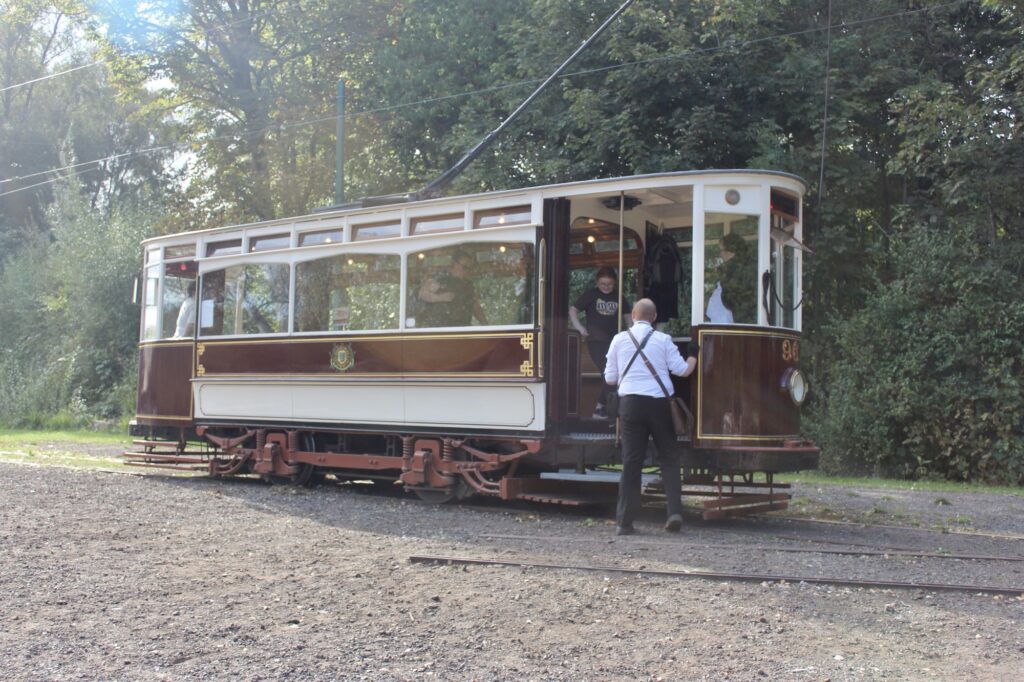
As well as having a dedicated stop on Manchester’s Metrolink tram network, there are heritage trams that run on a short tramway within the park itself. This tramway is Britain’s only dedicated heritage tramway that still runs on original tram track, as it uses a short spur built by the original Manchester Corporation Tramways that runs into the park. It’s been extended a couple of times, most recently in 2011, and now runs from the edge of the park to the boating lake, over a distance of about half a mile. There are two depots, at each end, and one of these includes a small tramway museum inside the original waiting shelter.
Tram services usually run at weekends in the summer. The heritage trams all come from the north of England – some from Manchester but others from Blackpool.
Heaton Park Animal Centre
Behind the hall’s old stables block, which is now a café and toilets, is the Heaton Park Animal Centre. This would have been the farm for the hall in its heyday, and nowadays a range of animals live there. They’re mostly farm animals – chickens, sheep, pigs and donkeys – but there are some alpacas and a tortoise there too. Like the rest of the park, entry is free although its opening hours are limited to 10-4. Whilst not as impressive as places like Cannon Hall Farm, it’s nice to pop in and see the animals.
Boating lake
There’s a large lake towards the southern tip of Heaton Park, where you can hire a boat for 25 minutes at a time. There’s a choice of boats – some are electrically powered, but you can opt for a swan-shaped pedalo or a traditional rowing boat. Prices range from around £15-30 and ideally you should book ahead.
In the summer, Heaton Park becomes an outdoor events venue – Oasis had their homecoming gig there last year.
Overall, Heaton Park offers enough for a full, varied day out – especially in summer. And, unless you need to pay for parking, the majority of what it offers is free. This is really important, in an age where lots of family activities cost increasing amounts of money. Whilst we often visit properties operated by the National Trust and are happy to pay for our annual membership, it’s really important that everyone has access to safe leisure activities and green space.
Accessibility
If you struggle with stairs, then you should still be able to get around most of the park as there are few steps. However, it is on a hillside, and some slopes may present a challenge for some powered wheelchairs. Disabled toilets are available, and there is a Changing Places toilet at the pavilion by the lake.
There are five car parks spread around the edge of the park. The largest of these is the Lake Car Park, with 263 spaces and a much larger overflow. We tend to use the Hall Car Park, which is closer to the hall, stables and animal centre and offers 252 spaces. All car parks have disabled spaces. Parking is pay and display, or using the PayByPhone app, and typically costs up to £4 to park all day.
The Golf Car Park, which is on the eastern tip of the park, is the only one with electric car charging facilities. It offers two 7 KW AC chargers on the Be.EV network; payment appears to be by app (including Zapmap and Electroverse) or RFID card. I haven’t used this one myself – as mentioned, it’s about a half hour drive for us. If you need a rapid charger, then there are several available around the perimeter of the park, including a 150 kW charger with five bays just off Junction 17 of the M60.
As mentioned, Heaton Park is served by Manchester Metrolink, with regular services on the Bury line. The tram stop is on the western edge of the park, across a road. Trams actually pass underneath the southern tip of the park in a tunnel.
We’re now six months into our electric car adventure. We do the vast majority of our charging at home – indeed, between September and December, we didn’t need to use a public charger once. But when we do need to use one, there can be multiple ways to pay. This blog post compares the three main ways: phone apps, RFID cards, and card payments.
Phone apps
Years ago, someone I knew had bought the then-new mark one Nissan Leaf. We’re probably talking ten years ago here, so back then public charging infrastructure was a long way behind what it is now. On the whole, he was really happy with his electric car, but he said his biggest gripe was the need to have a range of different apps to use with public chargers. I suppose it’s the same problem with parking apps.
Whilst many public chargers, especially the rapid ones, will accept other forms of payment, for some, using an app is the only option. On my phone, I have seven apps for paying for charging, although some are apps like Zapmap and Octopus Electroverse (which I compared here) which are primarily designed to help you find charging points. It just so happens that they also allow you to pay for your charging at many of them too. Indeed, I could probably yeet some of the brand-specific apps from my phone, as Zapmap and Electroverse support them directly.
That being said, some charging networks like Gridserve say that you will always get their best charging rate with their app, so it may be cheaper than other payment methods. Others, like Instavolt, offer sign-up incentives for using their app. For example, if you sign up with my referral code, dUmpH (charming), we’ll both get a £5 free credit the first time you charge 10 kWh using the app.
There are chargers I have encountered which would only work with an app. A good example is when we went to Portmeirion, where the chargers only worked with the Monta app. I now use Monta with my home charger thankfully so this app gets to stay. But having to download an app, which can be around a hundred megabytes, on a weak mobile data connection when you’re stood in the rain somewhere, isn’t a great experience.
A key advantage of using apps over the other methods is that you can usually track the progress of your charge on your phone – especially at rapid chargers. This is handy if you’re using the time your card needs to charge for other things, like having lunch at a motorway service station. Some even use the Live Tiles feature of iOS to show the status on your phone’s lock screen.
RFID cards
Another option is to use a Radio-frequency identification card, or RFID card. This is a credit-card sized card that you can order from a variety of providers. When you get to a charger, you can usually just tap the card on the chargepoint, and it’ll bill your chosen provider for your charge.
These are accepted by just about all rapid chargers, but also some slower ones. I recently used a charger on the Blink network, which accepted payment either by RFID card or app, but not by card payment.
Zapmap, Electroverse and some others will offer to send you an RFID card by post – and in the case of Electroverse, you won’t need to pay for it. You should only need one RFID card too; I’ve yet to find any chargers that would accept an RFID card from one company but not another. When I use my Electroverse card, I can also track my charge in the Electroverse app.
Overall, I find that RFID cards are more convenient than using apps, but I have found some chargers to be fussy about them. As in, they work fine when you use a payment card, but not with an RFID card.
Payment cards
Every rapid charger that I have encountered will also happily take a credit or debit card as payment. This works in a similar way to self-service pumps at petrol stations – your card is pre-authorised with a certain amount before you start, and then the actual amount is billed at the end.
Some slower AC chargers also now take payment cards, which is handy. Almost everyone has some form of payment card on them, or a phone that can make payments, and so it’s the most convenient option for most people. No apps to download or a special RFID card to send off for – you just pay for charging in the same way that you would pay for fuel.
As for the downsides? Generally you can’t track your charge on your phone, in the way you can with the apps. Some chargers may also charge a higher unit rate for using payment cards, rather than their own app. And some chargers only take contactless cards; whilst I doubt that’s an issue for many, you may need to use Apple Pay or Google Pay if you need to charge up beyond your contactless limit, or if you have made too many previous contactless payments in succession.
So what do I use?
Obviously there are some chargers where you don’t get a choice of method – they will only accept one payment method and you have to go with that. However, when I do have a choice, I tend to go for an app (if I have it) or my RFID card. I appreciate being able to check in the progress of the charge using my phone, and sometimes using an app is cheaper. I suppose if I was in a rush, then I would probably just use my debit card if that was the option though.
I run a few services on my Raspberry Pi, such as Mealie and Calibre-Web, which I want to be able to access when I’m away from home. I therefore use Nginx Proxy Manager to act as a reverse proxy, to make them available outside of my home network. However, in doing so, I’m also exposing them to the whole world wide web, including potential bad actors. So, as a security measure, I’m using an access list in Nginx Proxy Manager to restrict access to certain IP ranges.
The screenshot above shows what I’ve set up. Essentially, I’ve put in the IP ranges that I am likely to use on an ‘allow list’, and then all other IP ranges are blocked. These IP ranges include:
My current ISP
My mobile provider
My workplace
192.168.x.x for local connections
Any other IP address will just receive a 403 error from Nginx when they try to connect, and the requests won’t be forwarded on to the underlying app (e.g. Mealie). In other words, Nginx acts like a web application firewall. This builds on Nginx Proxy Manager’s ‘block common exploits’ feature to protect the web services you have running on your system. It’s also much safer that simply opening a port on your router directly to the underlying app.
By using IP ranges, it means that I don’t have to manually specify lots of individual IP addresses, should the one I use change.
CIDR notation
You may have noticed the /16 on the end of each IP address. This is ‘Classless Inter-Domain Routing‘ notation, or CIDR, which is apparently pronounced ‘cider’. Take for example 192.168.x.x/24 – this means that I’m allowing anything from 192.168.0.0 to 192.168.255.255.
If I wanted to, I could narrow this down to 192.168.0.x by using 192.168.0.0/24. Using ‘/24’ rather than ‘/16’ specifies a narrower range of IP addresses. Getting my head around CIDR notation was probably the hardest part of this; I ended up asking ChatGPT to explain it to me as I couldn’t find an actual web site that explained it in simple enough terms. Annoyingly, we didn’t cover this sort of thing in my Computer Science degree.
How to set up an Access List in NPM
In Nginx Proxy Manager, go to the ‘Access Lists’ tab at the top, and click ‘Add Access List’. You’ll then be asked to give it a name – I’ve just called mine ‘Standard list’ but you do you. On the next tab, you can optionally set a username and password; this will mean users will have to authenticate using HTTP Basic access authentication in addition to any required login for your chosen web service.
The ‘Access’ tab is where you specify the IP addresses or ranges. As per the screenshot above, you need to list the IP addresses that you want to allow first, and then have the last line as ‘deny’ and ‘all’ to block all other IP address. Once you’re done adding, save the list.
Go back to your Proxy Hosts page, and edit each one in turn (if you have set up more than one proxy host). On the first tab, at the bottom, you should now be able to select your newly created access list. You can apply the same access list to multiple proxy hosts, if you want to apply the same restrictions to all of them.
Hopefully now, with huge swathes of the Internet blocked by nginx, I’ll be less at risk should someone find an exploitable vulnerability in Mealie or Calibre-web.
What we don’t have to look forward to is Sci-Fi Weekender. Normally we head off to Great Yarmouth every March for a great weekend of geekery with friends, but it’s been cancelled this year. Over-running building work at the Vauxhall Holiday Park, where it’s hosted, mean that the event would have had to be scaled down, and it seems like a majority of other attendees decided to skip this year. We’re not out of pocket; we’ve asked for our booking to be rolled over to next year. And we would have been driving down, so we haven’t lost out on advance train tickets. We had word last week that it may be cancelled, and it so I’m hoping that some friends of ours who were planning to take the train managed have been able to claim on their travel insurance.
Still, we’re a bit gutted not to see people and have geeky fun there this year. We may still do something else with the weekend, as we have childcare in place, but we’ll see.
Easter break
Whilst the Easter weekend itself is in April, the school holidays start at the end of this month. That’s because Easter Sunday is two weeks earlier than last year. We usually arrange childcare for our ten-year-old, but we’ll see what they want to do nearer the time.
Depending on the weather, we may manage some more days out this month. Last month, we managed Cannon Hall Farm, but that was about it.