
Losing the language of love

Given with love

I’m working through the article that I’ve saved to Pocket over the past few weeks and came across a poignant piece called Losing the Language of Love (Web Archive Link). It’s about how you develop a special dialect when you’re close to someone for a long time, whether it’s a partner, friend or family member, and how it feels when that person is no longer a part of your life anymore.

It reminded me of the almost three and a half years that I spent with Hari, my first girlfriend. Over the years we developed our own dialect between us, much of it derived from gamer speak – we’d call each other ‘noob’ if we did something wrong, or use ‘zomg!’ as an expression of surprise. And, like in most relationships, we had pet names for each other that made no sense to anyone else.

We split up in March 2009. As well as losing a partner, I also lost a reason to use those words – they didn’t really mean anything to anyone else. And I’d feel uncomfortable using them with Christine – after all, I see them as relics from an old relationship that didn’t work out.

But then Christine and I also have our own words. Like most couples, we have our pet names for each other, which in both cases is ‘Squishy‘, because we’re just that sick-inducingly cute. And, by extension, our pet name for our unborn child is ‘the Squishlet’, even though we’ve basically settled upon a name for it based on its presumed gender. Plus, there are other words and phrases that we use that are probably meaningless to others.

When a relationship with someone close to you ends, it isn’t just the physical things that disappear. It’s also the less tangible things like words and phrases, that meant so much to you and your significant other. To others, they are just that – words and phrases with no context.
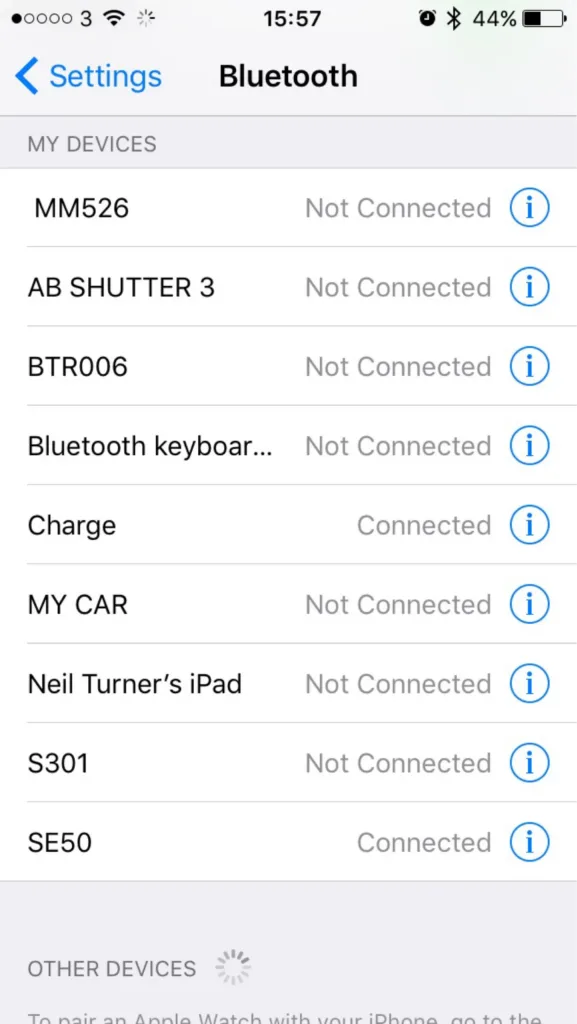
Here’s why friendly names are needed for Bluetooth devices on iOS

How many Bluetooth devices have you paired with your iPhone or iPad? Go on, have a look.

Okay, now go through each device and tell me what each one is. Because, if your list is anything like mine, you’ll struggle to identify each device from its name.

For reference, I’ve included a screenshot of the nine devices that are paired to my iPhone. In that list, there are:

  • Three Bluetooth speakers
  • One set of Bluetooth headphones
  • A Bluetooth camera remote
  • My iPad
  • A Bluetooth keyboard
  • My Fitbit
  • My car radio

The iPad is obvious, as is my car stereo and the keyboard. My Fitbit appears as ‘Charge’ as it’s a Fitbit Charge, and the camera remote is called ‘AB SHUTTER 3′ – close. For the remaining devices, without knowing the model numbers, or a process of trial-and-error, deducing which is which presents a challenge.

My iPad lets me change the name that appears to other devices, as do most phones or computers. But a cheap off-brand Bluetooth speaker doesn’t, especially as there’s no visual interface. Sure, you could probably re-program the device if you took it apart and hacked the firmware on the Bluetooth controller, but that’s beyond the capability of your average user.

It would be nice if users could assign a friendly name to these devices. ‘Waterproof speaker in shower’ is more meaningful to me than ‘MM526′. ‘MY CAR’ is all well and good but what if I had two cars?

It wouldn’t need a major change to the user interface of iOS. There’s already an ‘i’ icon next to each entry on the list – presently, this goes to a mostly blank screen with just a ‘Forget this device’ button. An extra field to add/edit a friendly name for the device is all that would be necessary. Doing so would improve the usability of Bluetooth on iOS significantly.

With the Emoji keyboard enabled, it would even be possible to add a pictogram to each friendly name. Instead of ‘MY CAR’, I could have ‘🚘 My BMW’, for example.

I understand that users with jailbroken devices can already do what I’m proposing. But jailbreaking isn’t an option for many, and so I’m hoping that someone at Apple will consider adding it for all users.

With iOS 9 now out, Apple must be planning for iOS 10 – this would be a really helpful little feature to include. I’m no programmer, but I can’t see it being too difficult, and it would be a small win for usability. How about it, Apple?

This post originally appeared on Medium.

Creative Commons License
Except where otherwise noted, the content on this site is licensed under a Creative Commons Attribution-ShareAlike 4.0 International License.